Adjusting Fixed-Width Regions

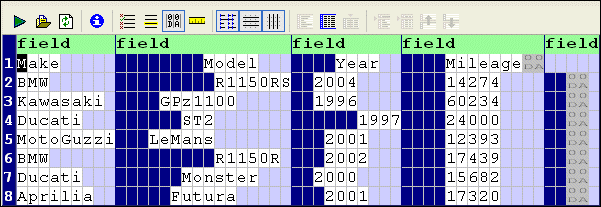
Stylus Studio uses a default row length of 80 characters for fixed-width files. You might need to adjust the row length of a region if your input file uses a different row length, or when converting a line-oriented region, like the one shown in Figure 181, to fixed-width.

Figure 181. Line-Oriented Region

There are three ways to specify the row length for a fixed-width region:

  • Using the Row Length property - simply change the default value, 80, to the value that is appropriate for the current region and press Enter.
  • Dragging the document pane to the left or right - move the pointer to the right border of the document pane. When it changes shape, press and hold mouse button 1 and drag the right border of the grid until the input file's fields are aligned.
  • Holding the Shift key and pressing the right arrow (to add width) or the left arrow (to decrease width)

Example

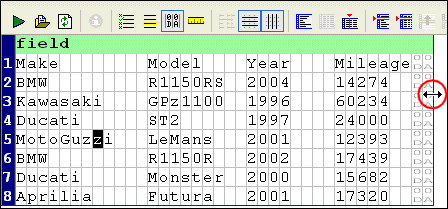
After converting the line-oriented region shown in Figure 181 to fixed-width, it looks like this:

Figure 182. Line-Oriented Region Converted to Fixed-WIdth

Figure 181 shows the same fixed-width file after it has been resized by dragging the document pane.

Figure 183. Resized Fixed-Width Region

XML Schema-Aware Queries and Stylesheets

Learn how to simplify XSLT and XQuery applications using Schema Aware XSLT and XQuery processing technologies.

An Introduction To XML Schema Development

An Introduction to XML schema development in Stylus Studio covers some of the highlights of our XML Schema Editor, powerful tools for editing, validating, converting and generating XML schema. Watch the video online today!

Biotechnology & Pharmaceuticals

Leading biotechnology & pharmaceuticals companies take Stylus Studio when they are feeling under the weather. Come see for yourself how Stylus Studio can be a pick me up for your biotechnology or pharmaceutical company.

OASIS Catalogs for Fun and Profit

This tutorial about, Understanding Catalogs, A Use-Case for Catalogs, Registering Catalogs in a Project, Using the DOCTYPE Syntax Sense:X Aid, Navigating Catalogs, Building Composite Catalogs, Converting TR9401 Catalogs to OASIS XML Catalogs and more

Stylus Most Wanted

 
Free Stylus Studio XML Training:
W3C Member