Cart
Cart
|
Home > Online Product Documentation > Table of Contents > Converting the Region Type Converting the Region TypeThe Region Type field in the Properties window displays information about the type of region Stylus Studio inferred when the file was first read. Its value is either Fixed-Width, Line-Oriented, or Unknown.
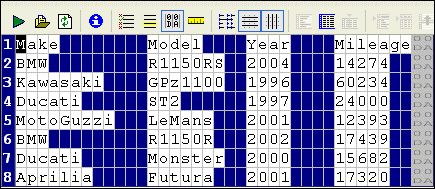
Stylus Studio's Convert to XML interprets regions with CR/LF control characters as line-oriented regions. There might be occasions, however, when you want to change the region type from line-oriented to fixed-width, or vice versa. This section describes the tools you can use to change a region from one type to another. Consider the following file fixed-width file:
It is a simple
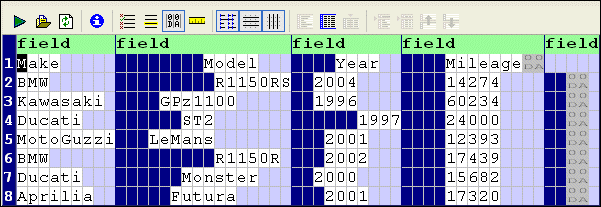
For display purposes, we can remove the spaces Stylus Studio has inserted for readability (the cells with the light blue shading) by clicking the
Align Fields (
When you convert a line-oriented region to a fixed-width region, Convert to XML removes spaces it added for readability and depicts only the spaces in the original input file used to create the fields and the field values themselves, as show in Figure 180.
By default, Stylus Studio displays fixed-width files using an 80-character row. This accounts for the input files appearance when it is first displayed as a fixed-width file - if you scan the document, you can see that all of the file's original information, including the CR/LF control characters has been retained, but that the formatting differs - the original input file had eight rows; now it has four rows of 80 characters.
How to Convert a Region TypeTo convert a region type:
1. Place the cursor anywhere in the region you want to change.
2. Click the
Convert to Fixed-Width Region (
 ) or
Convert to Line-Oriented Region (
) or
Convert to Line-Oriented Region (
 ) button. These actions are also accessible from the
ConvertToXML menu and the shortcut menu in the Convert to XML Editor.
) button. These actions are also accessible from the
ConvertToXML menu and the shortcut menu in the Convert to XML Editor.
3. If you have converted a line-oriented region to a fixed-width region, adjust the row length as needed. See
Adjusting Fixed-Width Regions.
|

XML PRODUCTIVITY THROUGH INNOVATION ™
 ) button. This results in a
display that resembles the source (
) button. This results in a
display that resembles the source (