Cart
Cart|
|
Home > Online Product Documentation > Table of Contents > Profiling XSLT Stylesheets Profiling XSLT Stylesheets
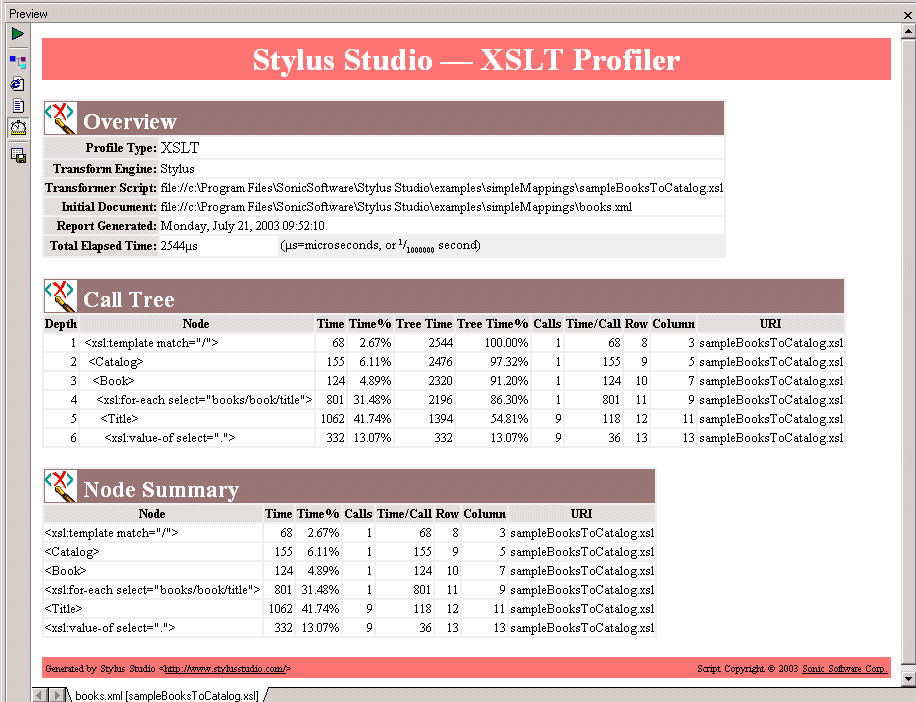
In addition to debugging tools for XSLT, Stylus Studio provides the XSLT Profiler, a tool that helps you evaluate the efficiency of your XSLT. By default, the performance metrics gathered by the XSLT Profiler are displayed in a preformatted report, like the one shown Figure 239:
The report format is controlled by the default XSLT stylesheet,
profile.xsl, in the
In addition to generating the standard XSLT Profiler report, you can save the raw data generated by the Profiler and use this data to create your own reports. See Enabling the Profiler for more information about this procedure. About metricsThe XSLT Profiler can record three different levels of performance metrics:
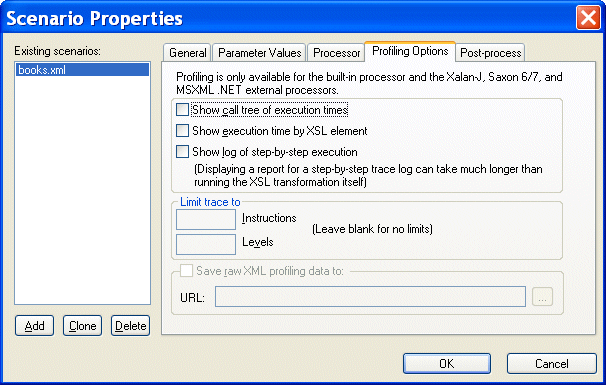
Enabling the ProfilerThe XQuery Profiler is off by default. You enable the Profiler on the Profiling Options tab of the XSLT Scenario Properties dialog box. To enable the XSLT Profiler:
1. Open the
Scenario Properties dialog box for the XSLT stylesheet. (Click
Browse
 at the top of the XSLT editor window.)
2. Click the
Profiling Options tab.
3. Select the settings for the performance metrics you want the Profiler to capture.
4. Optionally, save the raw Profiler data to a separate file.
5. Click OK.
The next time you preview the XSLT results, the performance metrics you selected are available to you in the XSLT Profiler report (and as raw data if you selected that setting and specified a file). Displaying the XSLT Profiler ReportTo display the XSLT Profiler report:
1. Ensure that the Profiler is enabled. (See
Enabling the Profiler if you need help with this step.)
2. Click the
Preview Result button (
 ).
).
3. Click the
Show Profiling Report button (
 ).
).
The XSLT Profiler report appears in the Preview window. |

XML PRODUCTIVITY THROUGH INNOVATION ™