Cart
Cart|
|
Home > Online Product Documentation > Table of Contents > Editing xsl: Instruction Properties Editing xsl: Instruction Properties
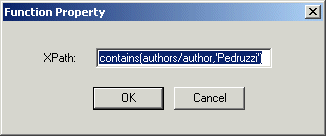
You can change or specify the properties associated with an xsl: instruction by editing the instructions properties. Each xsl: instruction block (and blocks for XPath functions) is associated with a dialog box that allows you to edit its basic properties, like this
Function Property dialog box for the
To edit xsl: instruction properties:
1. Right click on the instruction block whose properties you want to edit.
2. Select
Properties from the shortcut menu.
Stylus Studio displays the properties dialog box for the XSLT instruction or XPath function you selected from the mapper.
3. Edit the XPath expression as required.
4. Click
OK.
|

XML PRODUCTIVITY THROUGH INNOVATION ™