Overview of the XSLT Mapper

The XSLT mapper helps you compose XSLT that aggregates data from one or more source documents, regardless of their origin or XML. For example, an inventory application might use information from multiple vendors, each of whom organizes invoices in a different way. You can use the XSLT mapper to identify source documents, map the relevant nodes from each to a target document, and in doing that define any required XSLT instructions, XPath or Java functions, and logical operators graphically.

To use the XSLT mapper to create an XSLT stylesheet, you start by specifying one or more source documents and one target document.

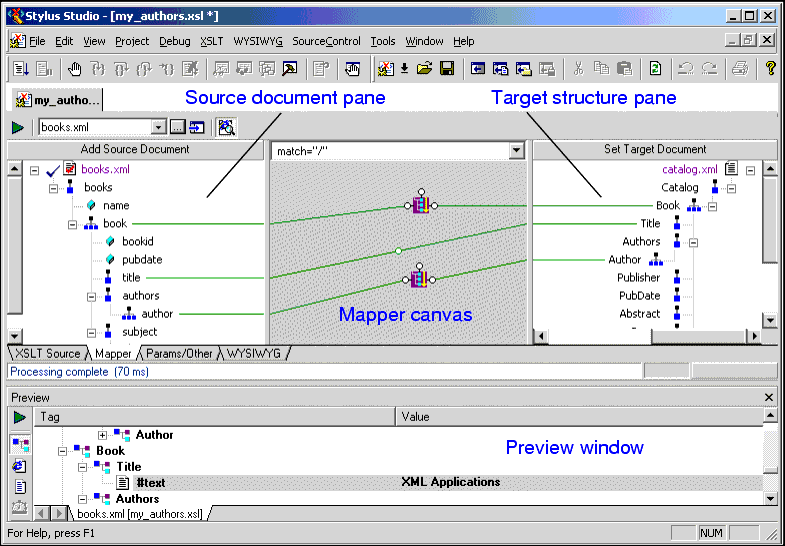
Figure 185. Example of XSLT Mapper

The Mapper tab consists of these areas:

  • Source document pane, in which you add one or more source documents.
  • Target structure pane, in which you specify the structure of the result you want the XSLT to return.
  • Mapper canvas, on which you can define conditions, functions, and operations for source document nodes to filter return values that are then mapped to the target node.
  • Source code pane (not shown in Figure 185). The source code pane allows you to view the source code while using the mapper. This is a great way to see how changes to the mapper affect the source, without the need to switch to the XSLT Source tab. Of course, the XSLT Source tab is available if you prefer working with the source using a full-page view. All views - Mapper tab, XSLT Source tab, and the source pane - are synchronized. When displayed, the source pane spans the width of the XSLT editor.

As you link elements and define XSLT instruction and function blocks in the mapper, Stylus Studio composes XSLT for you, which is visible (and editable) any time you click the XSLT editor's XSLT Source tab. When you have finished mapping, you can apply the stylesheet to XML documents that have the same schema as the source document. The result document also has the same schema as the destination document.

As with the XSLT Source tab, you can preview XSLT results from the Mapper tab by clicking the Preview Result button ( ). Debugging, however, can be performed from the XSLT Source tab only.

This section covers the following topics:

Advertising & Marketing

Learn about top advertising and marketing companies that are leveraging Stylus Studio 2006 to enhance their everyday work experience.

Chemical Companies That Use Stylus Studio

When working in a lab it's always important to have the right ingredients. That's why top chemical companies use Stylus Studio 2006 to create the ultimate experiments. See which of these top chemical companies are using Stylus Studio today!

XSD Mapping

Stylus Studio® includes a visual XSD-to-XSD mapping tool that allows you to easily implement sophisticated XML data mappings involving multiple data sources and customized data processing using either XSLT or XQuery code.

XMLSCHEMA-DEV Blog

XML Schema-DEV is an active community for XML Schema-releated development - join the discussion on XML Schema standards, tools, implementations and more. Bookmark this RSS or ATOM feed today!

Stylus Most Wanted

Site Map | Privacy Policy | Terms of Use | Trademarks
Free Stylus Studio XML Training:
W3C Member
Stylus Studio® and DataDirect XQuery™are products from DataDirect Technologies, is a registered trademark of Progress Software Corporation, in the U.S. and other countries. © 2004-2007 All Rights Reserved.