Cart
Cart
|
Home > Online Product Documentation > Table of Contents > What Is a Stylesheet? What Is a Stylesheet?A stylesheet is an XML document that contains instructions for generating a new document based on information in the source document. This can involve adding, removing, or rearranging nodes, as well as presenting the nodes in a new way. This following topics provide more information: Example of a StylesheetWhen you work with a stylesheet, three documents are involved: Source XML DocumentFor example, suppose you have the following XML document:
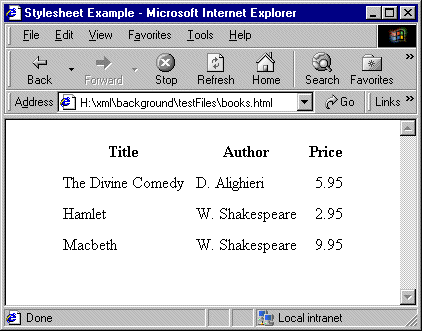
Resulting HTML FileYou can use a stylesheet to transform this XML document into an HTML document that appears as follows in a Web browser:
The Web page in Figure 160 is defined by the following HTML document:
The HTML document contains HTML markup that is not in the source document. In the HTML document, the data from the source document is not in the same order as it is in the XML source document. Also, this HTML document does not include some data that is in the XML source document. Specifically, the HTML document does not include information about the date of publication (the
Stylesheet UsedTo create this HTML file, the stylesheet contains two templates that provide instructions for Following is a stylesheet that does this.
About Stylesheet ContentsStylesheets are XML documents. They contain a combination of
Each XSLT element is an instruction to the XSLT processor. For information about all XSLT instructions, see XSLT Instructions Quick Reference. The Root element
The root element of a stylesheet must declare a namespace that associates a prefix with the URI for an XSLT processor. The URI in the namespace declaration in the previous example identifies the W3C standard XSLT processor. This declaration, shown again below, instructs the XSLT processor to recognize the XSLT elements and attributes by their
In this stylesheet, you must use the
When you write a stylesheet, you specify the actions you want the XSLT processor to perform when it processes a particular source node. To do this, you define XSLT templates, which are described in the next section. |

XML PRODUCTIVITY THROUGH INNOVATION ™