Using Web Service Calls as XML

In addition to opening a Web service call in the Web Service Call Composer for testing purposes, you can open a Web service call as an XML document anywhere in Stylus Studio - in the XML editor, or as a source document in the XQuery mapper for example. When you open a Web service call as an XML document, Stylus Studio automatically executes the SOAP request and displays the SOAP response.

Consider the following Web service call, stock.wsc. The Web service operation used in this example returns current stock quote and other information based on the ticker symbols provided as parameters. Here is the SOAP request composed by Stylus Studio:

<?xml version="1.0" standalone="no"?>
               
<SOAP-ENV:Envelope xmlns:SOAPSDK1="http://www.w3.org/2001/XMLSchema" 
xmlns:SOAPSDK2="http://www.w3.org/2001/XMLSchema-instance" 
xmlns:SOAPSDK3="http://schemas.xmlsoap.org/soap/encoding/" xmlns:SOAP-
ENV="http://schemas.xmlsoap.org/soap/envelope/">
               
	SOAP-ENV:Body>
               
		<s0:GetStockQuotes xmlns:s0="http://swanandmokashi.com/">
               
			<s0:QuoteTicker>prgs</s0:QuoteTicker>
               
		</s0:GetStockQuotes>
               
	</SOAP-ENV:Body>
               
</SOAP-ENV:Envelope>


	<soap:Body>
               
		<GetStockQuotesResponse xmlns="http://swanandmokashi.com/">
               
			<GetStockQuotesResult>
               
				<Quote>
               
					<CompanyName>PROGRESS SOFT</CompanyName>
               
					<StockTicker>PRGS</StockTicker>
               
					<StockQuote>20.10</StockQuote>
               
					<LastUpdated>10:17am</LastUpdated>
               
					<Change>+0.03</Change>
               
					<OpenPrice>20.05</OpenPrice>
               
					<DayHighPrice>20.40</DayHighPrice>
               
					<DayLowPrice>20.00</DayLowPrice>
               
					<Volume>13200</Volume>
               
					<MarketCap>695.1M</MarketCap>
               
					<YearRange>11.50 - 24.06</YearRange>
               
				</Quote>
               
			</GetStockQuotesResult>
               
		</GetStockQuotesResponse>
               
	</soap:Body>
               
</soap:Envelope>


And here is the SOAP response returned by the Web service:

<?xml version="1.0" encoding="utf-8"?>
               
<soap:Envelope xmlns:soap="http://schemas.xmlsoap.org/soap/envelope/" 
xmlns:xsi="http://www.w3.org/2001/XMLSchema-instance" 
xmlns:xsd="http://www.w3.org/2001/XMLSchema">


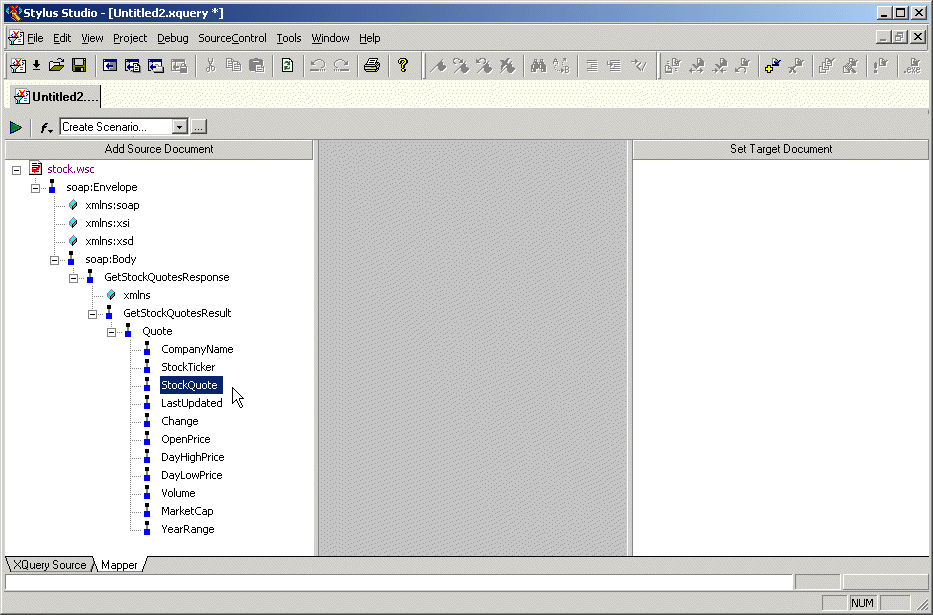
The saved Web service call can be used as the source document for an XQuery in the XQuery mapper, as shown in Figure 268:

Figure 268. Using a Web Service Call to Compose an XQuery

XQueries composed using a Web service call as a source document return real-time data from the Web service as a result.

Television

Television

XSD Editor

XSD Editor provides a synchronized split-pane interface that simultaneously shows both a visual XSD Diagram and the underlying code, with changes in one pane immediately reflected in the other

XQuery Tutorial

This XQuery Tutorial is about "BUILDING XQUERY BASED WEB SERVICE AGGREGATION AND REPORTING APPLICATIONS".

Medical Companies That Use Stylus Studio

Medical companies can't solve every ache and pain. That's why when it comes to the struggle of data integration, they turn to Stylus Studio to simplify their pains. Come see which medical companies are injecting Stylus Studio into their work load!

Stylus Most Wanted

 
Free Stylus Studio XML Training:
W3C Member