Modifying a SOAP Request

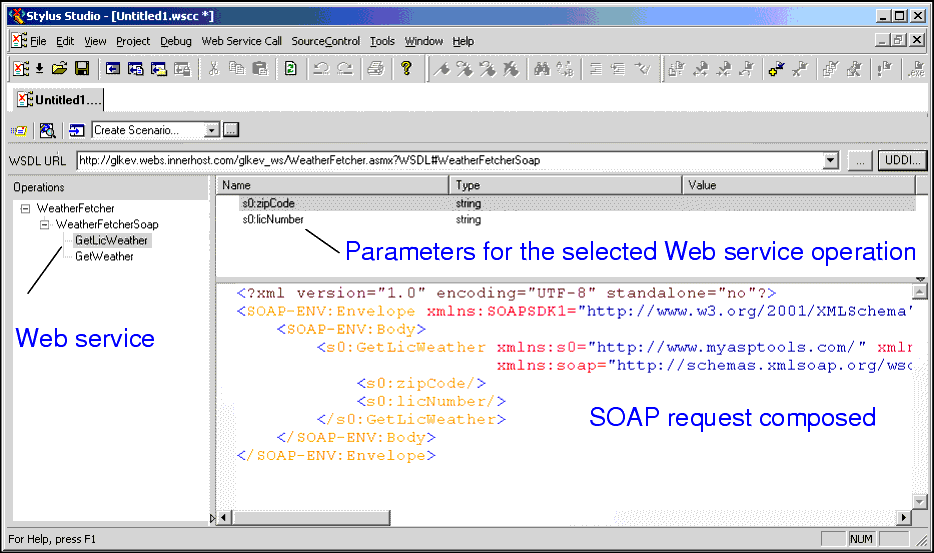
When you select a WSDL from the Result field in the UDDI Browser and click OK, the operations exposed by the Web service are displayed in the Stylus Studio Web Service Call Composer.

Figure 265. Modifying a SOAP request

When you select an operation from the Operations pane, Stylus Studio displays

  • Parameters associated with that operation, including their datatype and a field in which you can enter a value for testing purposes.
  • The XML that describes the SOAP request associated with that operation. You can edit the SOAP request, but for initial testing you should restrict changes to providing parameter values, and you can use the parameter's Value field for this purpose.

Database-to-XML Mapping

Stylus Studio features several database-to-XML mapping tools that allow you to easily query a relational database using SQL/XML or SQL and render the results as XML. Stylus Studio also supports the world's first and only visual SQL/XML Editor!

MySQL XML Tools

The MySQL tools in Stylus Studio simplify XML related development tasks for working with MySQL and XML.

Open XSLT Architecture

Learn how Stylus Studio's Open XSLT Architecture enables you to use any of the popular industry-standard XSLT processors (like Saxon, Xalan-J, MSXML, Microsoft .NET, and others) for all your XSLT development tasks.

WSDL Editor

WSDL Editor featuring a graphical WSDL viewer, syntax help, Java Web Service code generation and more. Simplify Web Services development with Stylus Studio's Web Service Description Language (WSDL) Editor today!

Stylus Most Wanted

Site Map | Privacy Policy | Terms of Use | Trademarks
Free Stylus Studio XML Training:
W3C Member
Stylus Studio® and DataDirect XQuery™are products from DataDirect Technologies, is a registered trademark of Progress Software Corporation, in the U.S. and other countries. © 2004-2007 All Rights Reserved.