Updating DOM Tree Structures

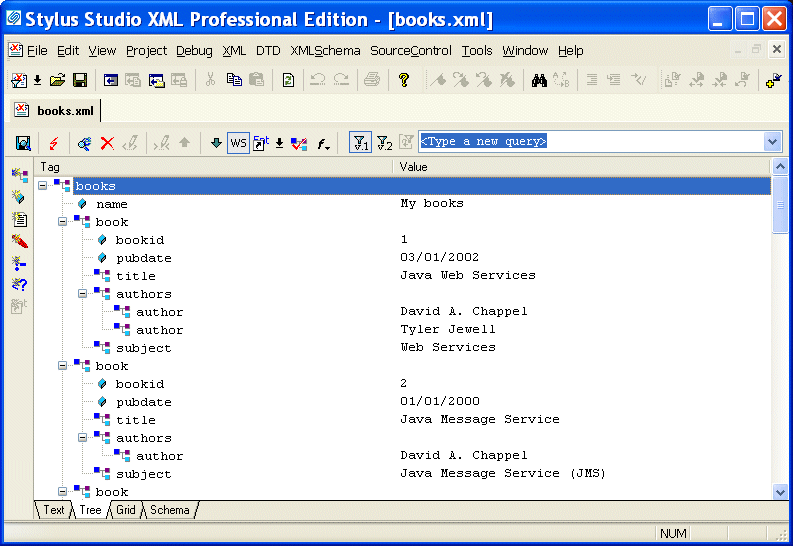
To update the DOM tree for an XML document, click the Tree tab at the bottom of the window that contains the document.

Figure 107. Tree Tab in XML Editor

While you are editing, if the display does not appear to correctly represent the current tree, click Refresh . If you want to perform a certain action and Stylus Studio has grayed out the button for that action, try clicking Refresh first.

To save your file, select File > Save from the Stylus Studio menu bar or click Save in the Stylus Studio tool bar.

This section discusses the following topics:

XML Developers' Bill of Rights

Stylus Studio's pledge to fight for the rights of XML Developers, providing the most productive, innovative and value-priced XML development tools.

XQuery Mapper

Stylus Studio has the industry's only XQuery mapper, enabling you to develop sophisticated XML mappings consisting of queries and data transformation in an intuitive, visual manner.

Text File to XML

Stylus Studio provides several easy-to-use document wizards that allow you to quickly convert text files to XML. Create XML from text and EDI, create XML Schema from EDIFACT, and more!

XML Helps Uncork Innovative Winery Web Sites

Learn how Freerun Technologies, Inc., a leading Internet services provider used Stylus Studio and XML technologies to develop a framework for Web-based eCommerce applications for the wine industry, reducing development cycles.

Stylus Most Wanted

Site Map | Privacy Policy | Terms of Use | Trademarks
Free Stylus Studio XML Training:
W3C Member
Stylus Studio® and DataDirect XQuery™are products from DataDirect Technologies, is a registered trademark of Progress Software Corporation, in the U.S. and other countries. © 2004-2007 All Rights Reserved.