Custom XML Validation Engines

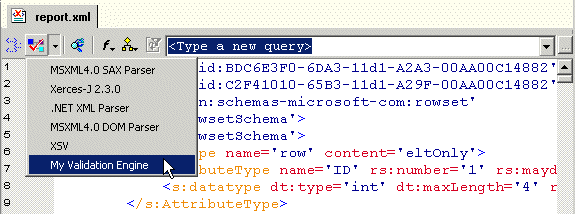
Stylus Studio supports several XML validation engines, including the MSXML4.0 SAX Parser, Xerses-J 2.3.0, and .NET XML. The custom validation engine feature lets you register your own XML validation engine with Stylus Studio. Custom validation engines are added to the Validate Document drop-down list in the XML Editor once you register them with Stylus Studio, as shown in Figure 284.

Figure 284. Validate Document Drop-Down List

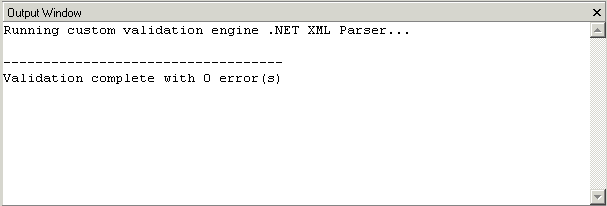
Output for custom validation engines is displayed in Stylus Studio's Output Window. Output for other custom applications, such as that created by the custom document wizard, is also displayed in Stylus Studio's Output Window.

Figure 285. Output Window

EDIFACT Reference

The EDIFACT Reference is a free developer resource providing the most in-depth information on EDIFACT constructs and data models.

Translating X12 Documents to XML

The X12 to XML Converter is a built-in function of the adapter library. The XML that is generated is well commented and indented, and can be used anywhere XML is normally used — with XML Schemas, XSLT, XQuery, etc.

XSL-List

The XSL-List forum is a valuable learning resource for the Extensible Stylesheet Language (XSL), covering the XSL specification, XSL processor implementations, and XSL user questions. Get this free XSL resource delivered to your inbox today.

XML Operations

Using XML Pipeline it's easy to visually specify a series of XML operations to apply on your XML data, including parsing, validating, converting and transforming, according to the needs of your business application.

Stylus Most Wanted

 
Free Stylus Studio XML Training:
W3C Member