|
|
Home >Online Product Documentation >Table of Contents >How to Run a Scenario How to Run a ScenarioTo run a scenario:
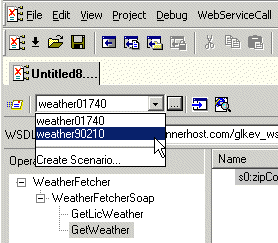
1. Select a scenario from the scenario drop-down list at the top of the editor window: Alternative:
a. In the Web Service Call Composer tool bar, click Stylus Studio displays the Scenario Properties dialog box.
b. On the General tab, select the scenario you want to run from the Existing preview scenarios list.
c. Click OK.
2. Click the Send Request button (
|
Using DataDirect XQuery with Stylus Studio
Learn how to query any relational database using XQuery and the XQuery API for Java using DataDirect XQuery, an embeddable Java component, and Stylus Studio the world's leading XML IDE.
XSL and XSLT Tools
XSLT tools in Stylus Studio let you easily edit, debug, design and profile XSLT stylesheets using a powerful and intuitive graphical user interface.
XPath Editor
Stylus Studio's intelligent code-sensing, auto-completion technology, Sense:X, is XPath-aware. You'll find Sense:X for XPath in all of Stylus Studio's editors, including the XML Editor, XSLT Editor, and XQuery Editor.
XML to PDF
Convert XML to PDF using Stylus Studio's XML publishing tools - the easiest way to design beautiful document layouts for use in XSL:FO based multi-channel publishing and single source publishing applications.