|
Home >Online Product Documentation >Table of Contents >Viewing Sample XML Viewing Sample XML
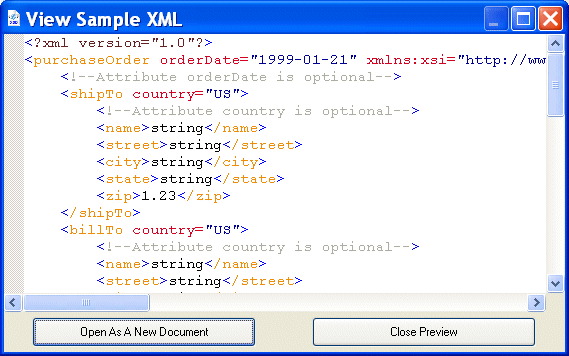
You can view a sample of the XML represented by a node in the XML Schema Diagram tab. You can also optionally create an XML document based on that instance. For example, here is an instance of the XML represented by the If you want, you can create a new XML document based on this instance by clicking the Open as New Document button. To view sample XML:
1. In the Diagram tab, select the node for which you want to see sample XML.
2. Select Diagram > View XML Sample from the Stylus Studio menu.
Alternative: Select View XML Sample from the node's shortcut menu (right-click to display). The View Sample XML dialog box appears. (See Figure 287.)
3. If you want to open this instance as a new XML document in Stylus Studio, click the Open as a New Document button. Otherwise, click Close Preview.
|

Using DataDirect XML Converters
Learn how to use DataDirect XML Converters and the Stylus Studio Java Code Generator to deploy the XQuery applications you build in Stylus Studio to a live server environment.
Educational Institutions That Use Stylus Studio
Education is the most powerful tool one can have. That's why these top education providers reach for Stylus Studio to educate their students and professors as well. See which education providers have the most powerful XML IDE in their classrooms!
Technology Companies That Use Stylus Studio
Technology companies can't always handle every technology that they come across. That's why when it comes to XML, they look to Stylus Studio to guide them. Check out which top technology companies are looking to the future with Stylus Studio.
Supported XML Technologies
Learning XML is easy with Stylus Studio, the only XML IDE to support all official W3C XML technologies! Learn more about Stylus Studio's tools and support for XML and related W3C technologies.