|
|
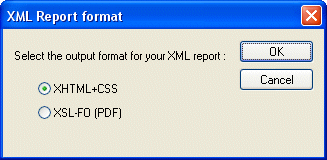
Home >Online Product Documentation >Table of Contents >Choosing a Report Format Choosing a Report FormatWhen you create an XML Report in Stylus Studio, you need to specify the format you want for the finished report - HTML (XHTML+CSS) or PDF (XSL-FO). Stylus Studio can generate XQuery or XSLT code for either format. You specify report format using the XML Report Format dialog box, which appears when you create a new XML Report in Stylus Studio: Specifying a format up front allows Stylus Studio to use format information to expose format-specific properties - like headers and footers for reports in PDF, for example - to help speed and simplify report creation. |

Using Relational Data in XML Applications
"Using Relational Data in XML Applications" By Dr. Michael Kay covers an overview of several common use cases and provides insight into the benefits and drawbacks of using the approaches available today including XQuery and SQL/XML.
Learn Stylus Studio in 6 Minutes
Learn Stylus Studio in 6 Minutes is the world's fastest introduction to XML development using Stylus Studio. In just six minutes, learn how to leverage Stylus Studio's powerful XML tools and utilities to simplify XML development.
Retail Companies That Use Stylus Studio
Stores and XML data can get very crowded. That's why retail companies use Stylus Studio to simplify their data. With the power of Stylus Studio these top retail companies are at the front of the line when it comes to XML!
Updating Relational Data Using Stylus Studio