|
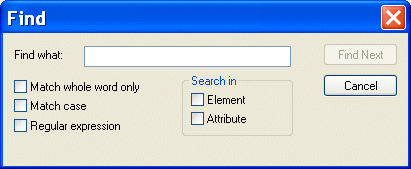
Home >Online Product Documentation >Table of Contents >Searching Document Panes Searching Document PanesYou can search document panes using the Find dialog box. You can restrict your search to elements and/or attributes, and you can even search using regular expressions to define your match pattern. To display the Find dialog box:
1. Right-click in the document pane.
2. Select Find from the shortcut menu.
|

Computing XML Differences in Stylus Studio
See for yourself just how easy it is to visually compare different XML files or folders using Stylus Studio's powerful new XML Differencing Utility. Quickly and easily analyze and merge changes made to different XML documents!
HTML Tidy
HTML Tidy is a program for turning HTML into something that can be parsed as XML, unlocking their data for use in XSLT and XQuery programs. Learn how to use HTML Tidy in Stylus Studio now.
WSDL Editor
WSDL Editor featuring a graphical WSDL viewer, syntax help, Java Web Service code generation and more. Simplify Web Services development with Stylus Studio's Web Service Description Language (WSDL) Editor today!
Chemical Companies That Use Stylus Studio
When working in a lab it's always important to have the right ingredients. That's why top chemical companies use Stylus Studio 2006 to create the ultimate experiments. See which of these top chemical companies are using Stylus Studio today!