|
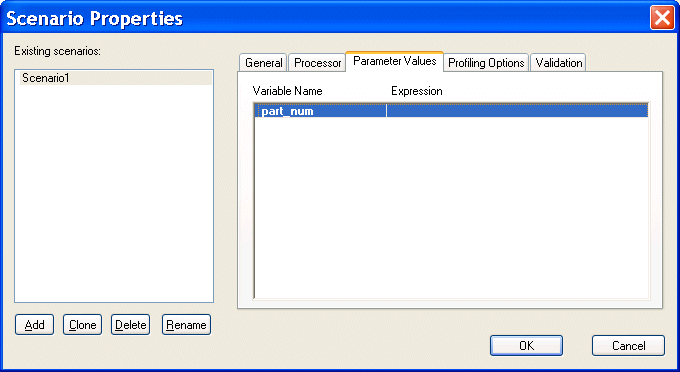
Home >Online Product Documentation >Table of Contents >Setting Values for External Variables Setting Values for External VariablesThe Parameter Values tab of the Scenario Properties dialog box displays any external variables you have defined in the XQuery source. You can specify the parameter value you want to use for any external variables when you run the scenario. For example, imagine your XQuery code contains the following: This variable is displayed on the Parameters tab as follows: When you run the scenario, you can specify the parameter value you want to use by double-clicking the Expression field and typing a value. Valid values are XPath expressions and must be entered using single or double quotes. |

Semiconductors & E-Components
Buuuuuzzzzz, zappp! There sure is a lot of electiricty flying with these semiconductors & c-component producers. It is because these top companies use Stylus Studio 2006 to light up their work day!
DataDirect XML Converters
DataDirect XML Converters are high-performance Java components which provide bi-directional, programmatic access to virtually any data source as XML.
Supported XML Technologies
Learning XML is easy with Stylus Studio, the only XML IDE to support all official W3C XML technologies! Learn more about Stylus Studio's tools and support for XML and related W3C technologies.
Mail, Package & Freight Delivery
Want to know what mail, package & freight delivery companies are shipping away there XML woes? Now you can! Check out these top mail, package & freight delivery companies that are packaged with the power of Stylus Studio.