|
Home >Online Product Documentation >Table of Contents >Using the XPath Query Editor Using the XPath Query Editor
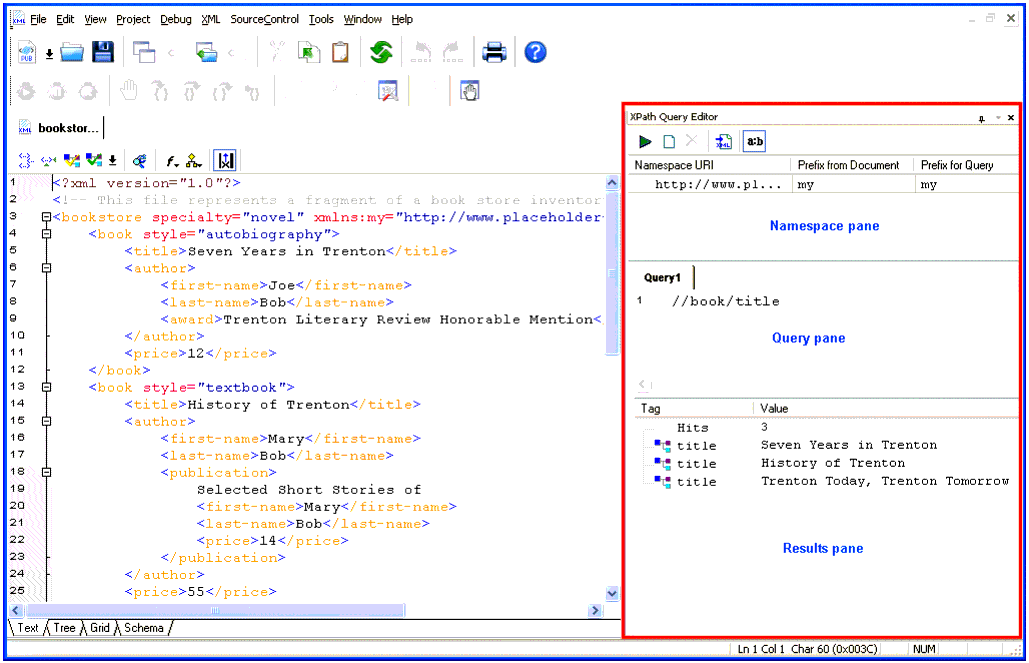
The XPath Query Editor is a dockable window that you can use to query XML documents in Stylus Studio. An example, showing an XPath expression being evaluated against bookstore.xml from the Example project installed with Stylus Studio, is shown here:
A complete list of the videos demonstrating Stylus Studio's features is here: http://www.stylusstudio.com/xml_videos.html. |

EDI to XML Mapping
A tutorial on how to transform EDI files into XML using Stylus Studio's Convert to XML tool. Subsequent post-processing of the converted EDI data is done through XQuery or XSLT, modeling a real world XML data integration application.
Biotechnology & Pharmaceuticals
Leading biotechnology & pharmaceuticals companies take Stylus Studio when they are feeling under the weather. Come see for yourself how Stylus Studio can be a pick me up for your biotechnology or pharmaceutical company.
XML Processing
Learn how to simplify XML Processing using Stylus Studio XML Pipeline, the easiest way to visually design and deploy virtually any XML processing tasks.
Industrial & Farm Equipment
Industrial & farm equipment manufacturers are mowing away the time it takes for data integration with the power of Stylus Studio 2006! See which top industrial and farm equipment manufacturers are cowboying up with Stylus Studio.