|
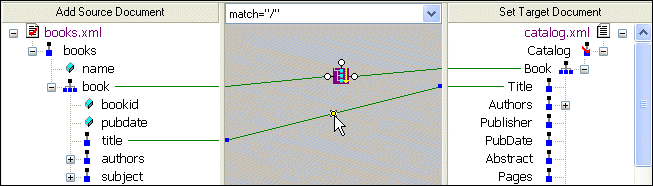
Home >Online Product Documentation >Table of Contents >Deleting Links in Sample Files Deleting Links in Sample FilesThis topic is part of a sequence that starts with Opening the XSLT Mapper. To delete links:
1. Click the Mapper tab if it is not already selected.
2. Click the title to Title link to select it.
3. Press the Delete key, or
a. Right-click the selected link. This displays a shortcut menu.
b. Click Delete to delete the selected link.
|

Report Generation - Visually Defining Relationships in XML Publisher
Develop report generation applications with a powerful relationship manager in XML Publisher which provides a powerful and easy way to group and join data from one or more data sources.
Create XML Views of Relational Data Using DataDirect XQuery
DataDirect XQuery simplifies creating, querying and updating of relational databases as XML including Microsoft SQL Server, Oracle, IBM DB2, Sybase and Informix.
XML Schema Validator, DTD Validator
Stylus Studio lets you validate XML documents using integrated XML Schema or DTD validators. Use the Stylus Studio built-in validator, or any number of supported XML parsers and XML validators like MSXML SAX and DOM, Xerces, .NET, and more!
Internet & eBusiness