Updating a Sample Document Using the Grid Tab

This section provides instructions for updating the your-quotes.xml document using the Grid tab of the XML Editor. The Grid tab is useful for displaying structured data. It is a convenient way to view a document that contains multiple instances of the same type of element, for example.

A complete list of the videos demonstrating Stylus Studio's features is here: http://www.stylusstudio.com/xml_videos.html.

To update XML document using the Grid tab:
1. If it is not already open, open your-quotes.xml.

See Opening a Sample XML Document if you need help with this step.

2. At the bottom of the XML Editor window, click the Grid tab.

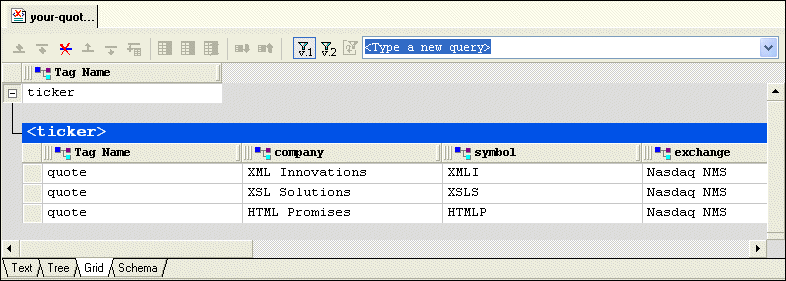
Stylus Studio displays a table that contains the XML data.

The left most column, with the Tag Name heading, contains the children of the <ticker> element. The remaining columns contain the grandchildren of the <ticker> element. The heading of each column identifies the element name - company, symbol, and so on.

The row is highlighted in blue.

4. Click the Insert row after ( ) button.

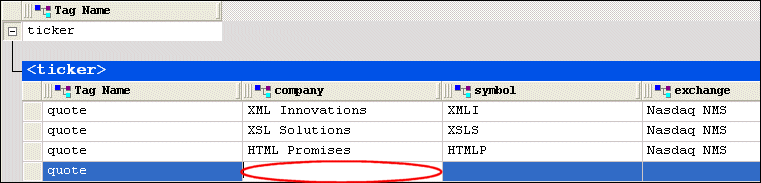
A new instance of the <quote> element is added to the document. The cursor is placed in the <company> element cell.

Stylus Studio creates the value for the <company> subelement.

6. Press Tab (or use the right arrow key) to move the cursor to the next cell in the row.
7. Repeat step 5 and step 6 to create values for the <symbol> and <exchange> subelements.
8. If you want, you can continue to add the data contained in a quote element.

Publishing & Printing

It is really hard to get things to look pretty, especially XML. That's why these publishing & printing companies use Stylus Studio to make a Mona Lisa out of data integration. Check out these top companies that are "stunning" with Stylus Studio!

Content Management

Build Content Management systems with Stylus Studio's powerful XML publishing tools that enable you to unlock and re-use valuable content from your enterprise information repositories.

XQuery Functions - User Defined Functions in XQuery

Dr. Michael Kay's tutorial entitled: 'Defining your own Functions in XQuery' explains how to write powerful User Defined Functions in XQuery.

Using Stylus Studio with RenderX XEP

RenderX XEP is a production-quality engine that converts XSL:FO into PDF or PostScript files. You can use RenderX XEP in place of the Apache FOP engine to render PDF files from Stylus Studio.

Stylus Most Wanted

 
Free Stylus Studio XML Training:
W3C Member