|
Home >Online Product Documentation >Table of Contents >How to Create an XML Publisher Report How to Create an XML Publisher ReportTo create an XML Publisher report:
1. Select File > New > XML Report from the Stylus Studio menu.
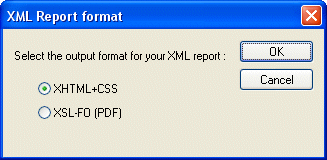
The XML Report Format dialog box appears.
2. Select the desired report format (HTML or PDF) and click OK.
An untitled |

Saxon XSLT Processor
Stylus Studio® has partnered with Saxonica, a leading provider of Java-based XSLT and XQuery processing components to offer a robust XSLT 1.0 and 2.0 development environment, featuring development and deployment using the Saxon XSLT processor.
XQuery Tools Support for TigerLogic XDMS
Stylus Studio's integration with the TigerLogic XDMS XQuery processor, allowing you to execute advanced XQuery expressions directly against any TigerLogic XDMS instance.
Technology Companies That Use Stylus Studio
Technology companies can't always handle every technology that they come across. That's why when it comes to XML, they look to Stylus Studio to guide them. Check out which top technology companies are looking to the future with Stylus Studio.
XML Generator
Create sample XML instance documents from any XML Schema using the XML Generator. The generated XML document is always valid, well-formed XML!