Cart
Cart|
Home >Online Product Documentation >Table of Contents >How to Generate Code How to Generate CodeTo generate code for an XML Publisher report:
1. Preview the XML Publisher report. If it is satisfactory, continue with this procedure.
2. Click the Generate button.
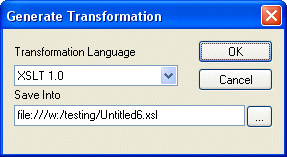
Alternative: Select Report > Generate from the menu. Stylus Studio displays the Generate Transformation dialog box.
3. Use the Transformation Language field to specify whether you want to use XSLT 1.0, XSLT 2.0, or XQuery 1.0.
4. The default URI for the generated XSLT or XQuery code is displayed in the Save Into field. Unless you specify otherwise, Stylus Studio uses the .report file name for the .xsl or .xquery file name.
5. Click OK.
|

XML PRODUCTIVITY THROUGH INNOVATION ™