|
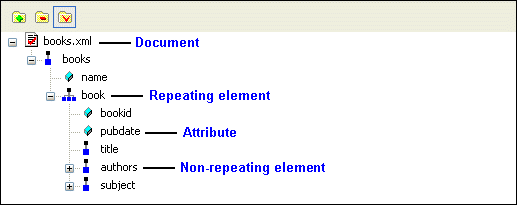
Home >Online Product Documentation >Table of Contents >Example: Dropping a Repeating Node Example: Dropping a Repeating NodeAs described earlier, the data source - whether it is an XML document, a relational database table, an EDI file converted to XML, or some other XML data source - is represented as a data model in the data sources panel. The glyphs used for the nodes are based on the object they represent in the data source, as shown here.
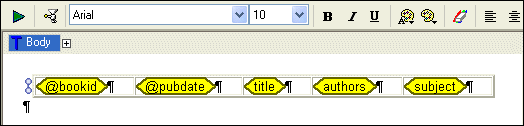
For this example, we use The following table summarizes the types of components you can create and automatically populate with data based on the node type. See Working with Report Components for information about specific components. |

XML File Explorer
The XML File Explorer provides a productive, consistent, and easy-to-use interface for working with any data sources (relational data, EDI, binary, XML, CSV, and more) used in enterprise data integration projects.
Learn XQuery Visually
Stylus Studio offers three infomative XQuery demonstration videos illustrating Stylus Studio's XQuery Editor, Mapper, Debugger and other advanced functionality. Watch them today!
Food & Beverage Services
"I'll have a burger and a side of Stylus Studio", says these top food & beverage services that use Stylus Studio in everyday operations. Come see which food & beverage services eat up the idea of having the most powerful XML IDE at their finger tips!
An Introduction To XML Schema Development
An Introduction to XML schema development in Stylus Studio covers some of the highlights of our XML Schema Editor, powerful tools for editing, validating, converting and generating XML schema. Watch the video online today!