|
Home >Online Product Documentation >Table of Contents >How Data Sources are Represented in XML Publisher How Data Sources are Represented in XML Publisher
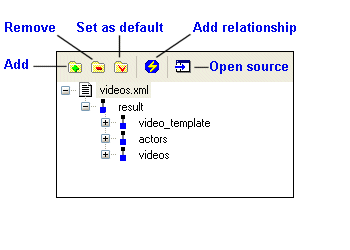
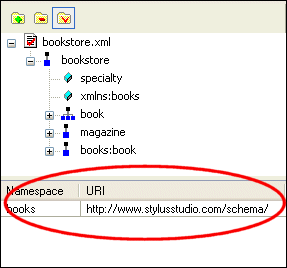
When you add a data source to the data sources panel, Stylus Studio displays the schema representation, or the data model, for that source. The following illustration shows how the Working with NamespacesIf the document you have selected as a source uses a namespace prefix, Stylus Studio displays the prefix and the URI at the bottom of the data sources panel, as shown in Figure 436.
You can edit the value in the Namespace field, which can simplify the process of typing XPath expressions you might use when defining a property. For example, you could change |

XML Schema Validation
Validate XML using XML Schema with MSXML, XERCES, XSV, SYSTEM.XML, & other XSD Validators. Stylus Studio's XML Schema-Aware XML Editing makes XML Schema Validation a snap!
Using the Stylus Studio XML Grid View
This free onlince video tutorial shows how to use the Stylus Studio XML Grid View.
Java XML Parser
Stylus Studio's support for Java XML Parser is able to Validate XML Using any Java XML Parser, Edit, Debug, Profile and Map XSLT using any Java XSLT Processor, Create PDF files Using Apache FOP, hand have Support for Microsoft XML Parsers as well.
Banks That Bank on Stylus Studio for Enhanced XML Productivity
Guess what! You can pass go and collect 200 dollars because with Stylus Studio 2006 you can save your banking company time and labor in every day work activities. Come see which banking companies are already taking advantage of Stylus Studio today!