Home >Online Product Documentation >Table of Contents >XML Pipeline Editor Toolbar
XML Pipeline Editor Toolbar
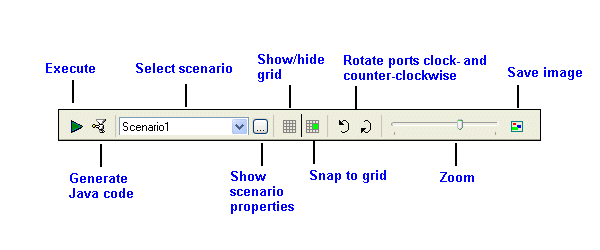
The XML Pipeline Editor toolbar provides easy access to operations you are likely to perform while building XML pipelines and working with XML pipeline diagrams in Stylus Studio. Figure 386 identifies the toolbar's tools.
|
Figure 386. XML Pipeline Editor Toolbar Buttons
Many of these operations are also available from the XMLPipeline menu and canvas short-cut menu (right-click to display). See Menu Actions for more information.
Toolbar Button
|
Description
|
|---|
Execute
|
Executes the current XML pipeline and displays the results in the Preview window. Output (error and warning messages, for example) appear in the Output window.
|
Generate Java Code
|
Generates Java code for the current XML pipeline.
|
Select Scenario
|
Allows you to choose the XML pipeline scenario for execution and code generation.
|
Display Scenario Properties
|
Displays the Scenario Properties dialog box, which allows you to create and define properties for XML pipeline scenarios.
|
Show Grid
|
Shows (or hides) the grid that appears on the XML Pipeline Editor canvas.
|
Snap to Grid
|
Allows you to choose whether you want objects to be placed automatically on the closest grid line (snap), or whether you want to be able to place them anywhere on the grid you choose. Snap to grid is off by default.
|
Rotate Ports Counter-Clockwise
|
Allows you to rotate the ports on the selected node counter-clockwise.
|
Rotate Ports Clockwise
|
Allows you to rotate the ports on the selected node clockwise.
|
Zoom
|
Zooms the XML Pipeline diagram on the canvas.
|
Save Image
|
Saves the entire XML Pipeline diagram (not just what is visible on the canvas) to an image file.
|
Table 113. Toolbar Button Descriptions
 Cart
Cart