|
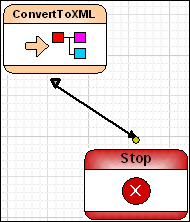
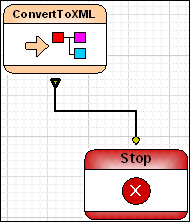
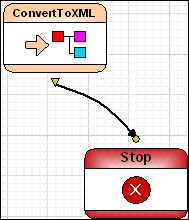
Home >Online Product Documentation >Table of Contents >Edge Style Edge StyleYou can choose from one of three edge styles for the pipes that connect one node to another: When you change the style, either from the XMLPipeline menu or the toolbar, you change the style To change the edge style:
1. Select the pipe, or the node whose pipes, you want to change.
2. Select XML Pipeline > Edges Style from the menu.
Alternative: Right-click and select XML Pipeline > Edges Style from the shortcut menu.
3. Select the edge style you want from the drop-down menu.
|

Mail, Package & Freight Delivery
Want to know what mail, package & freight delivery companies are shipping away there XML woes? Now you can! Check out these top mail, package & freight delivery companies that are packaged with the power of Stylus Studio.
Using Relational Data in XML Applications
"Using Relational Data in XML Applications" By Dr. Michael Kay covers an overview of several common use cases and provides insight into the benefits and drawbacks of using the approaches available today including XQuery and SQL/XML.
Scientific, Photo & Control Equipment
Scientific, photo & control equipment companies hear clicks and beeps all day. But, when it comes to data integration it needs to be done in a flash, that's why they use Stylus Studio. Come see which top companies are seeing XML in a brand new light!
Web Service Data Mapping
Stylus Studio makes it possible for you to use Web services as live XML data sources for XML mapping projects.