Cart
Cart|
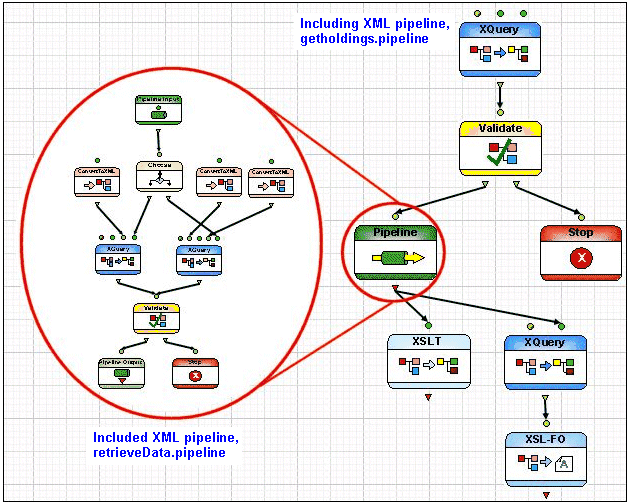
Home >Online Product Documentation >Table of Contents >Pipeline and Related Nodes Pipeline and Related NodesIncluding an XML pipeline refers to the process of inserting one XML pipeline inside another - instead of piping a node's output to an XQuery or XSLT transformation for processing, for example, output is piped to the included XML pipeline. That XML pipeline performs the processes defined by its nodes, and then returns one or more outputs to a node in the including XML pipeline for subsequent processing. Example
The Included XML pipelines, as any other documents (XQuery and XSLT, for example), cannot be edited from the including XML pipeline. You must open these documents separately. Pipeline Node Input and Output PortsA Pipeline node displays input and output ports only if the XML pipeline it represents has been defined with Pipeline Input and Pipeline Output nodes, as shown in Figure 423. These nodes allow the included XML pipeline to be connected to the including XML pipeline. How to Include an XML PipelineTo include an XML pipeline:
1. Define the XML pipeline (XML pipeline A) you want to include in another XML pipeline (XML pipeline B).
2. Ensure that you have defined Pipeline Input and Pipeline Output nodes for XML pipeline A (the XML pipeline to be included in XML pipeline B).
3. Drag and drop XML pipeline A into XML pipeline B.
Alternative: Create an empty Pipeline node in XML pipeline B and manually specify the URL for XML pipeline A in its
4. Connect the input and output ports of the Pipeline node representing XML pipeline A to node ports in XML pipeline B as required.
|

XML PRODUCTIVITY THROUGH INNOVATION ™