Cart
Cart
|
Home >Online Product Documentation >Table of Contents >Creating Custom EDI Message Types Creating Custom EDI Message TypesDataDirect XML Converters supports the Standard Exchange Format (SEF), which allows you to describe structure of an EDI document. This allows the DataDirect XML Converters for EDI to convert proprietary EDI message types that are based on an extension (or restriction) to a standard EDI message type. You can instruct the EDI XML Converter to read your SEF extension file and use it when converting your proprietary EDI to XML. You can find a copy of the SEF standard specification on the DataDirect XML Converters web site: http://www.xmlconverters.com/SEF You can create custom EDI message types for Custom message types must be either EDIFACT- or X12-style messages, since the auto-detection feature of the DataDirect XML Converters for EDI depends on the initial segments of those dialects as well as on the general syntax of the document. You cannot, for example, create an HL7 EDI message, since HL7 is structurally different (it allows messages to span documents, it allows segments to be split and continued, it has a sub-field structure, and so on). Process OverviewThe process for using a custom EDI message type includes the following steps:
1. Create a SEF file ( mycustomEDI.sef, for example) that describes how the custom EDI message type differs from the EDI standard on which it is based - its extensions or restrictions, in other words. The purpose of this document is to teach the DataDirect XML Converters engine the differences between your custom EDI message type and the EDI standard message type on which it is based.
2. Open the EDI file you want to convert to XML. Select File > Open, and then select the Open Using XML Converter check box.
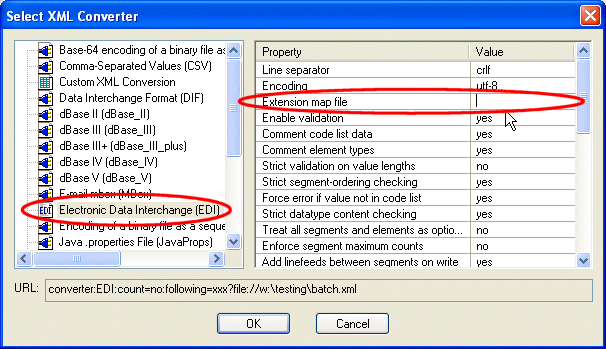
3. Specify the file URL for the SEF file ( mycustomEDI.sef , for example) in the Extension map file property when you specify the properties for the DataDirect EDI XML Converters in the Select XML Converter dialog box. See Specifying the SEF File Location if you need help with this step.
4. Click OK to convert your custom EDI message type to XML.
Specifying the SEF File LocationYou can specify the location of the SEF file in the Extension map file property using Note that if you are using a relative path, it must be relative to the same directories in which the DataDirect XML Converters executables are installed:
In environments in which the location of the |

XML PRODUCTIVITY THROUGH INNOVATION ™