Cart
Cart
|
Home >Online Product Documentation >Table of Contents >How to Create a Custom XML Conversion Definition How to Create a Custom XML Conversion DefinitionTo create a custom XML conversion definition (.conv file):
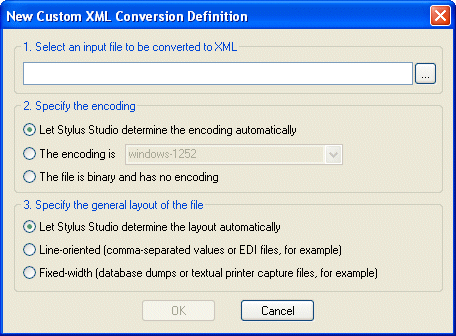
1. Select File > New > Custom XML Conversion from the Stylus Studio menu.
The New Custom XML Conversion Definition dialog box appears.
2. Click the browse button (  ) and select the file you want to use to configure the custom XML conversion definition settings.
The Open dialog box appears. By default, the Files of Type field filter is set to display
3. Click the Open button.
Stylus Studio displays the file URL in the first field of the New Custom XML Conversion Definition dialog box.
4. Optionally, change the default file encoding and layout settings.
5. Click OK.
Stylus Studio displays the file you selected in the Custom XML Conversions Editor.
6. Examine the file and its properties as it was read into the Custom XML Conversions Editor by Stylus Studio.
7. Modify the file layout, its regions, and its fields as needed. See Working with Regions and Working with Fields if you need help with this step.
8. Modify the properties that govern XML output as needed. See Controlling XML Output if you need help with this step.
9. Click the Preview Results button (  ).
).
Stylus Studio displays the Save As dialog box.
10. Enter a name for the custom XML conversion definition and click Save.
|

XML PRODUCTIVITY THROUGH INNOVATION ™