Cart
Cart
|
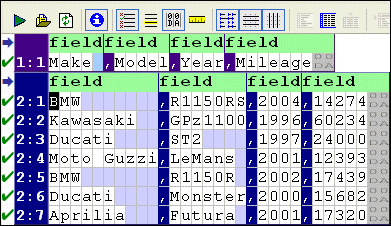
Home >Online Product Documentation >Table of Contents >Regions RegionsA region is the largest organizational component in an input file. Regions are interpreted by Stylus Studio when the input file is first read into the Custom XML Conversions Editor. You can use the editor to define your own, as well. An input file can contain one or more regions; every input file has at least one region that starts at offset 0. Multiple regions are common in binary files, which often contain a fixed-size header and then one or more records containing the actual data. Regions are fixed in size and cannot repeat. In the Custom XML Conversions Editor, regions are numbered, starting with 1, followed by the row number. For example, in an input file with two regions, you might see rows labeled as follows: 1:1, 2:1, 2:2, 2:3, and so on, as shown here: Region TypesRegions can be fixed-width or line-oriented. You can also set the Region Type property to No-output. Regions that are marked as No-output are grayed out in the Custom XML Conversions Editor, and they are not converted to XML. Managing RegionsStylus Studio provides tools that let you create new regions, and join one region with another. You can also change a region's type, define different line terminators across regions, and mark a region so that it is excluded from output. For information on these and other topics, see Working with Regions. |

XML PRODUCTIVITY THROUGH INNOVATION ™