Creating a Stylesheet from HTML

You can create an XSLT stylesheet from an HTML file using the HTML to XSLT document wizard.

Tip


Stylus Studio also has a document wizard that converts HTML to XML. See Creating XML from HTML.

To run the HTML to XSLT document wizard:
1. Select File > Document Wizards from the menu.

The Document Wizards dialog box appears.

2. Click the XSLT Editor tab.
3. Double-click HTML to XSLT (or select the HTML to XSLT icon and click OK).

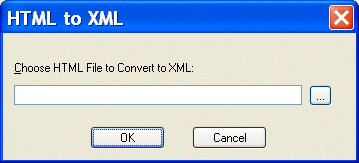
The HTML to XML dialog box appears.

Figure 211. HTML to XML Dialog Box

4. Enter the name of the HTML file you want to convert to XSLT in the Choose HTML File to Convert to XSLT field.
5. Click OK.

Stylus Studio opens the converted HTML file as an untitled XSLT document in the XSLT Editor.

XML Schema Documentation Generator

Stylus Studio's XML Schema Editor includes an integrated XML Schema documentation generator, allowing you to easily publish XML content models defined in XML Schema in a convenient, HTML format. A screenshon of the XML Schema Editor is shown here.

XML Schema-Aware Queries and Stylesheets

Learn how to simplify XSLT and XQuery applications using Schema Aware XSLT and XQuery processing technologies.

EDI Mapping

To transform EDI to XML, whether for X12 or EDIFACT, Stylus Studio provides the design tools and run-time support. EDIFACT, X12 and custom EDI formats can be translated, validated and mapped using the EDI Mapping adapter technology described here.

Visual Data Integration Using Stylus Studio XML Pipeline

XML Pipeline is a visual data integration tool for designing, editing, debugging and deploying XML applications. This tutorial covers building a data integration application that aggregates CSV and EDI data and publishes a report to HTML and PDF.

Stylus Most Wanted

 
Free Stylus Studio XML Training:
W3C Member