About the XSLT Editor

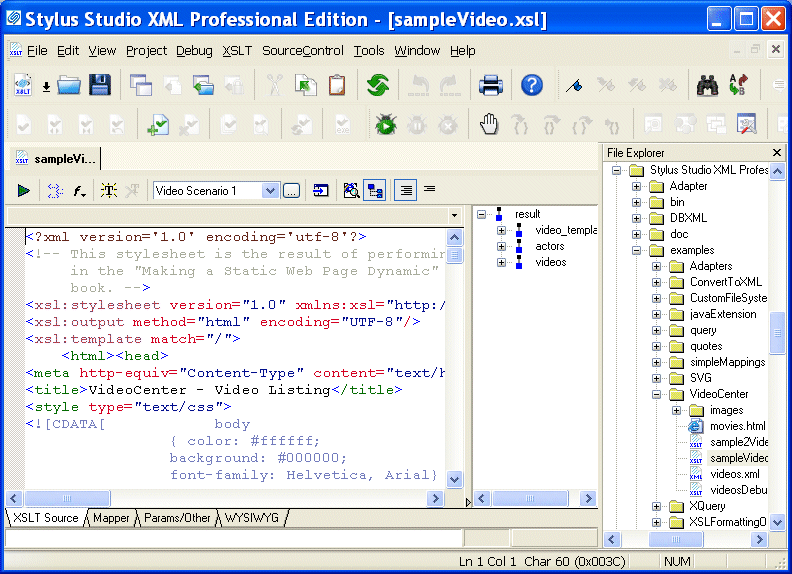
The XSLT editor, which displays a stylesheet when you open it, has four tabs at the bottom.

Figure 210. XSLT Editor

The XSLT Source, Mapper, and Params/Other tabs are always available. The WYSIWYG tab is available only when the stylesheet generates HTML.


The WYSIWYG tab is available only in Stylus Studio XML Enterprise Edition and Stylus Studio XML Professional Edition.

Editing XSLT as XML

If you want, you can edit an XSLT file as an XML file. To do this, open the stylesheet in the XML editor instead of in the XSLT editor. In the Open dialog box, click the down arrow in the Open button. Click XML Editor in the drop-down menu. A document can be open in the XML editor and in the XSLT editor at the same time.

Stylesheet Design - How to Publish your Data Using a Stylesheet Designer

Simplify Stylesheet Design with Stylus Studio's XML Publisher, a visual stylesheet designer and code generator to help you create XSLT or XQuery to publish your data to HTML+CSS or XSL:FO.

Simple API for XML (SAX)

SAX stands for Simple API for XML - SAX is an XML standard used everywhere in Stylus Studio, for parsing and building representations of XML documents.

Advertising & Marketing

Learn about top advertising and marketing companies that are leveraging Stylus Studio 2006 to enhance their everyday work experience.

XML Schema Validation

Validate XML using XML Schema with MSXML, XERCES, XSV, SYSTEM.XML, & other XSD Validators. Stylus Studio's XML Schema-Aware XML Editing makes XML Schema Validation a snap!

Stylus Most Wanted

 
Free Stylus Studio XML Training:
W3C Member