Creating a Template That Matches the author Element

This topic is part of a sequence that starts with Creating a New Sample Stylesheet.

To define a template that matches the author element:
1. In the XSLT editor source document tree pane, expand the book element.
2. Double-click the author element.

Stylus Studio creates a template that matches the author element, and places it near the end of the stylesheet.

3. In the XSLT editor pane view, edit the template body so that it contains only the following contents.
<xsl:value-of select="first-name"/>
               
&nbsp;
               
<xsl:value-of select="last-name"/>


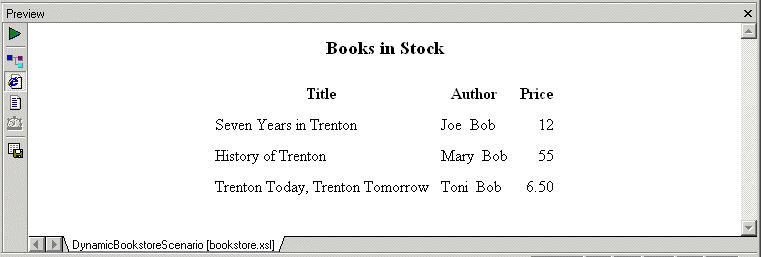
If you do not include the nonbreaking space entity, the first name and the last name have no space between them. Press F5 to see the results of this change, as shown in Figure 209.

Figure 209. Result of XSLT with an Author Template

4. Save the stylesheet by clicking Save .
5. Close the stylesheet by clicking File > Close on the Stylus Studio menu bar.

Mail, Package & Freight Delivery

Want to know what mail, package & freight delivery companies are shipping away there XML woes? Now you can! Check out these top mail, package & freight delivery companies that are packaged with the power of Stylus Studio.

Telecommunications Companies That Use Stylus Studio

Can you here me now? When it comes to telecommunications and XML it can get a little fuzzy. That's why these top telecommunication companies turn to Stylus Studio to connect them to their XML needs.

Why XQuery - The Case for XQuery

Read "The Case for XQuery" - an article that debuted in the November 2005 issue of SOA WebServices Journal, written by Jerry King, Vice President of DataDirect Technologies.

Advertising & Marketing

Learn about top advertising and marketing companies that are leveraging Stylus Studio 2006 to enhance their everyday work experience.

Stylus Most Wanted

 
Free Stylus Studio XML Training:
W3C Member