Creating a Template That Matches the book Element

This topic is part of a sequence that starts with Creating a New Sample Stylesheet.

The template that matches the root node includes an xsl:apply-templates instruction that selects book nodes for processing.

To define the template that matches the book element:
1. In the XSLT editor source document tree pane, expand the bookstore element.
2. Double-click the book element.

Stylus Studio creates a template that matches the book element. The new template is near the end of the stylesheet and has the form <xsl:template match="book">. In the tree pane, the yellow check next to the book element indicates that there is a template that matches this element.

3. In the XSLT editor pane, add the following instructions to the new template's body:
<tr>
               
  <td><xsl:apply-templates select="title"/></td>
               
  <td><xsl:apply-templates select="author"/></td>
               
  <td align="right"> 
               
  <xsl:apply-templates select="price"/>
               
  </td>
               
</tr>


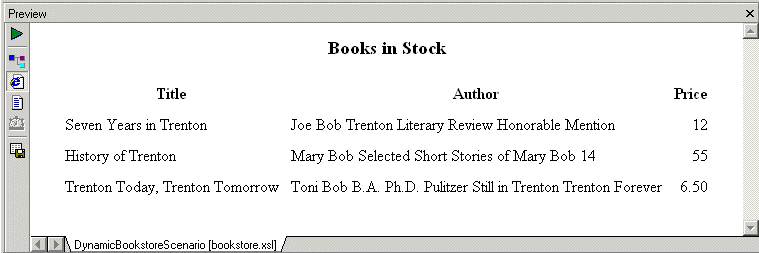
Press F5 to see the results. The result document looks like that shown in Figure 208:

Figure 208. Result of Applying XSLT

In the book template, the xsl:apply-templates instructions cause the XSLT processor to instantiate the default templates. For the title and price elements, this works correctly because those elements include only a text node. But for the author element, the use of the default templates copies too much information to the result table. You need to explicitly define a template for the author element.

XML Editor

Stylus Studio XML editor includes many XML editing utilities and features to simplify XML development, including intuitive XML editing views, integrated XML validation and troubleshooting utilities, XML formatting tools, XML generation tools, etc.

Java IDE

Edit, compile and debug and generate Java code with Stylus Studio's Java Integrated Development Environment (IDE). Supports popular Java XML processing components including Apache Xalan, Apache Axis, Apache Xerces, Saxon and more.

OASIS Catalog Support

Stylus Studio's features for working with OASIS catalogs allow you to incorporate any vendor's catalog - or one of your own - in your XML, making writing correct and robust XML easier than ever.

Oracle XML Tools

Oracle XML tools for working with relational and XML data, including exporting of database tables to XML and importing XML into the Oracle8i, Oracle9i and Oracle10g databases.

Stylus Most Wanted

 
Free Stylus Studio XML Training:
W3C Member