Cart
Cart
|
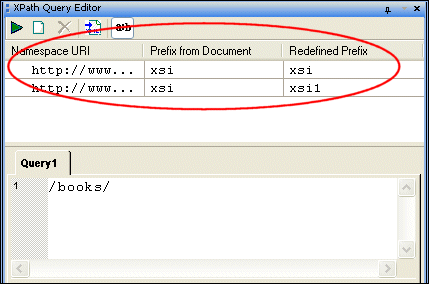
Home > Online Product Documentation > Table of Contents > Working with Namespaces Working with NamespacesWhen the XML document you are querying has references to one or more namespaces, those namespaces are displayed in the namespace pane, as shown here:
In addition to the namespace URI, Stylus Studio displays the namespace prefix defined in the XML document. If one namespace prefix defined in the XML document clashes with another, the second prefix is redefined by adding a number to the end of the original prefix name to make it unique - for example, if two namespaces had the prefix myPrefix, the second would be redefined as myPrefix1. Namespace prefixes are redefined only in the context of the XPath Query Editor; namespace definitions in the XML document are unaffected. You must use redefined namespace prefixes when writing your query expressions, though you can specify your own redefined name if you like. Redefined namespaces Changes saved to the XML document are reflected in the namespace pane when you click on the namespace pane or query pane. To change a redefined namespace prefix:
1. Click the
Show Namespaces button (
 ) if the namespace pane is not already displayed.
The namespace pane shows any namespaces that have been defined for the current XML document, as well as the namespace prefix defined in the document and the redefined namespace prefix suggested by Stylus Studio.
2. Optionally, change the value in the
Redefined Prefix field.
|

XML PRODUCTIVITY THROUGH INNOVATION ™