Manually Entering SQL/XML

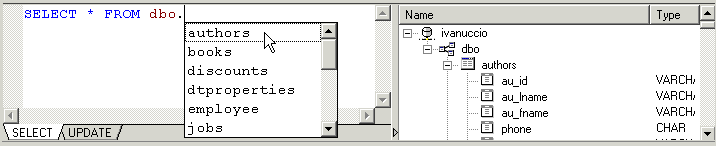
When you type a qualified name in the SELECT or UPDATE tabs of the editor, Stylus Studio's auto-completion feature displays a list of valid names. For example, when you type the period in this statement, SELECT * FROM dbo., Stylus Studio displays the following:

Figure 391. Example of Stylus Studio's Auto-Completion

To finish the statement, select the object name from the drop-down list and press Enter (or just double-click).

Building Workflow Applications with XML

Learn how to design custom XML workflow applications - from modeling your data and information processes, to capturing input from users in XML, and finally, generating useful queries and reports from the XML data -- using XSLT & XQuery technologies.

Data Integration Tools: Using the Stylus Studio XML Pipeline to Visually Integrate and Publish Data

Data Integration Tools from Stylus Studio include a visual pipeline editor, support for non-XML data sources, scalable data integration components, cross-language debugging and Java code generation. Try it now.

XML Helps Uncork Innovative Winery Web Sites

Learn how Freerun Technologies, Inc., a leading Internet services provider used Stylus Studio and XML technologies to develop a framework for Web-based eCommerce applications for the wine industry, reducing development cycles.

Visual Data Integration Using Stylus Studio XML Pipeline

XML Pipeline is a visual data integration tool for designing, editing, debugging and deploying XML applications. This tutorial covers building a data integration application that aggregates CSV and EDI data and publishes a report to HTML and PDF.

Stylus Most Wanted

 
Free Stylus Studio XML Training:
W3C Member