Cart
Cart|
Home > Online Product Documentation > Table of Contents > Creating a Database Connection from the File Explorer Creating a Database Connection from the File ExplorerYou can also create a database connection from the File Explorer window. To create a database connection:
1. Display the
File Explorer window if it is not already open (
View > File Explorer).
2. In the
File Explorer window, right-click the
RelationalDB icon and select
New Server from the short-cut menu.
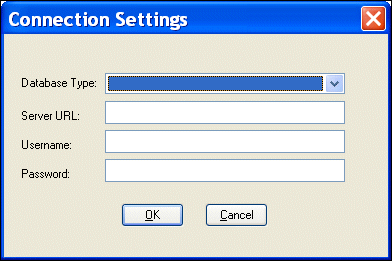
Stylus Studio displays the Connection Settings dialog box.
3. Specify the information needed to create the database connection and click OK. (See
Specifying Connection Settings if you need help with this step.)
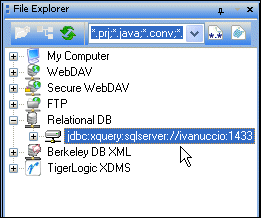
The server connection appears in the File Explorer window.
4. Expand the server connection to expose the relational objects you want to include in your DB-to-XML data source.
|

XML PRODUCTIVITY THROUGH INNOVATION ™