|
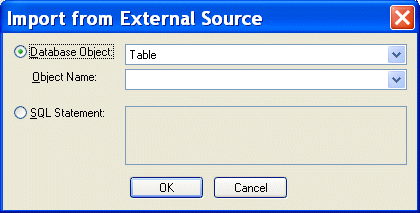
Home > Online Product Documentation > Table of Contents > Creating XML from ADO Creating XML from ADOYou can use the XML from ADO document wizard to create XML from relational database objects like tables and views. This document wizard allows you to access any relational database that supports OLE DB, such as SQL Server. After you specify the OLE DB provider and database server connection information on the Microsoft Data Link Properties dialog box, Stylus Studio displays the Import from External Source dialog box, shown here:
You use this dialog box to specify either: When you click OK, Stylus Studio selects the database object (or executes the SQL statement) and returns it as an XML document in the XML Editor. |

ZapThink Report: Using Stylus Studio to Deploy XML Data Services
A Zapthink analyst discusses how to create the next generation of XML data services using Stylus Studio XML tools - Download the special report today for free.
XPath Introduction - Using XPath Queries to Extract Data from XML Documents
The XPath introduction covers how to use XPath code completion, XPath syntax highlighting, support for XPath 2.0 functions and XML namespaces to simplify your next XPath application.
Building Workflow Applications with XML
Learn how to design custom XML workflow applications - from modeling your data and information processes, to capturing input from users in XML, and finally, generating useful queries and reports from the XML data -- using XSLT & XQuery technologies.
Computing XML Differences in Stylus Studio
See for yourself just how easy it is to visually compare different XML files or folders using Stylus Studio's powerful new XML Differencing Utility. Quickly and easily analyze and merge changes made to different XML documents!