How to Create a Named or Matched Template

To create a named or matched template:
1. Right-click the XSLT mapper canvas.
2. Select Create Template > Named Template or > Matched Template from the shortcut menu.

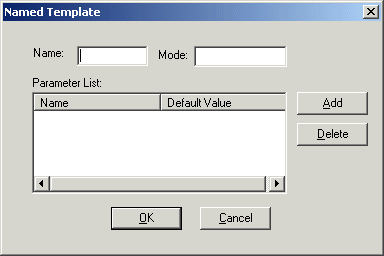
Stylus Studio displays the Named Template (or Matched Template) dialog box. (The Named Template dialog box is shown in Figure 261.)

Figure 261. Named Template Dialog Box

3. Enter a name and, optionally, a mode.
Tip


You can use a mode to define the conditions under which a template will be applied by a stylesheet.

4. Optionally, create one or more parameters:
a. Click the Add button.

The Name column becomes editable.

b. Type a parameter name and press Enter.

The Default Value field becomes editable.

c. Type a default value.
d. If you want to define another parameter, click ADD; otherwise, go to step 5.
5. Click OK to finish creating the template.

DTD Validator

This page talks about Stylus Studio's DTD Validator it has the ability to specify any third-party XML parsers and validators, real-time syntax checking and DTD validation error reporting, backmapping, integrating third-party DTD validators and more!

XML Validator

Stylus Studio has a built-in XML validator that supports industry-standard DTD and XML Schema validators including MSXML 4.0 SAX, MSXML 4.0 DOM, Microsoft .NET XML Parser (System.XML), Xerces-J 2.5.1, XSV 2.6, etc. Validate XML with Stylus Studio.

Data Integration Tools: Using the Stylus Studio XML Pipeline to Visually Integrate and Publish Data

Data Integration Tools from Stylus Studio include a visual pipeline editor, support for non-XML data sources, scalable data integration components, cross-language debugging and Java code generation. Try it now.

Single Source Publishing

Single source publishing is the ability to use one source of information for generating multiple types of output. Stylus Studio XML Publishing enables Single Source Publishing - publish PDF or HTML documents from Relational, XML or Legacy files.

Stylus Most Wanted

 
Free Stylus Studio XML Training:
W3C Member