Home >
Online Product Documentation >
Table of Contents >
Graphical Support for Common XSLT Instructions and Expressions
Graphical Support for Common XSLT Instructions and Expressions
The XSLT mapper has graphical support for
- XSLT instructions
- XPath functions
- Logical operators
- Java Functions
Using special symbols, called
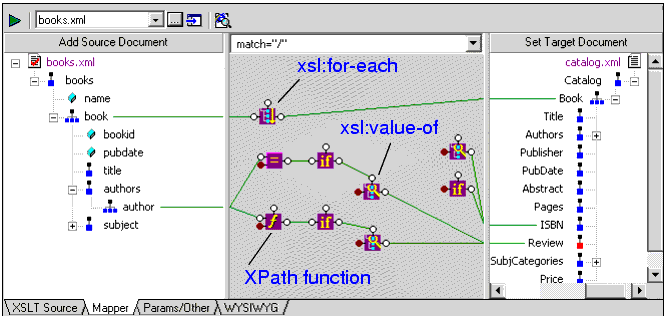
blocks, you can quickly and easily create complex XSLT without writing any code, as shown in
Figure 237:
|
|
Figure 237. XSLT Operation, Function, and Logical Operator Blocks
Blocks can be created
- Automatically, when you link one node to another. For example, if you link repeating elements in the source and target documents, Stylus Studio automatically creates an
xsl:for-each instruction block in the mapper.
- Manually, by selecting the instruction or expression you want to create from the shortcut menu on the mapper canvas (right click on the mapper canvas to display this menu).
- By reverse-engineering the XSLT that you write on the
XSLT Source tab - when you click the
Mapper tab, XSLT that can be represented graphically is displayed on the mapper canvas.
See
Working with XSLT Instructions in XSLT Mapper and
Processing Source Nodes to learn more about working with blocks in the XSLT mapper.
 Cart
Cart