Viewing the FO Sample Application

To view the FO sample application included with Stylus Studio:
1. In Stylus Studio, open the examples\XSLFormattingObjects\minimal-catalog.xsl file in your Stylus Studio installation directory.

Alternative: If the Stylus Studio examples project is open, you can access this file from the Project window. To open the examples project, open examples.prj in the Stylus Studio examples directory.

The video scenario has already been defined. In the Post-process tab of the Scenario Properties dialog box, Postprocess with Apache FOP is selected.

In this scenario, Stylus Studio selects elements to operate on from three different documents. These documents are in the examples directory of the Stylus Studio installation directory. They are also in the examples project. The documents are:

    • VideoCenter\videos.xml
    • simpleMappings\books.xml
    • simpleMappings\catalog.xml
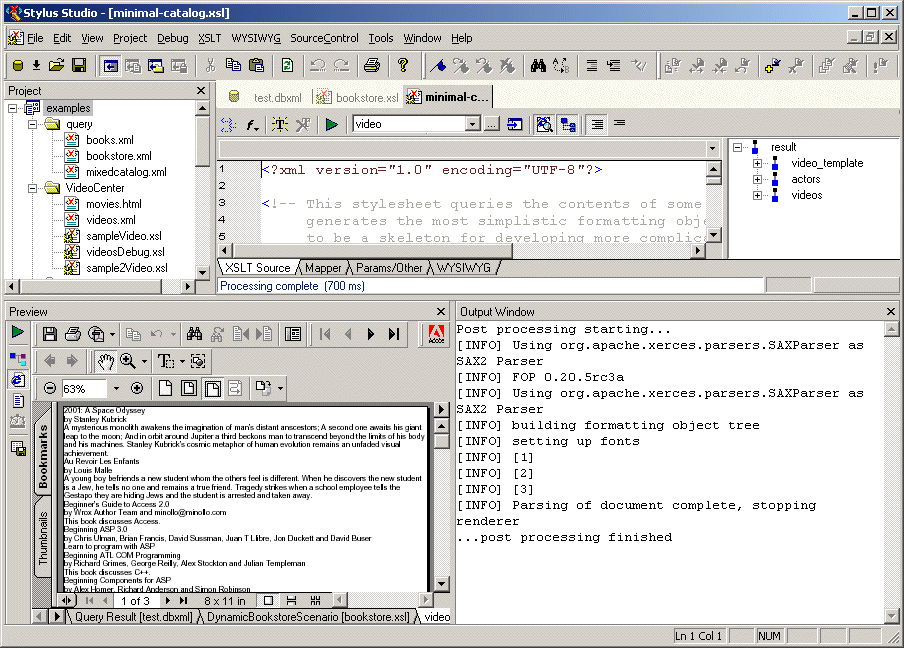
2. Click Preview Result . As you can see, the Output Window shows some post-processing information messages.

Figure 230. Example of XSLT FO Processing

After a few seconds, the Preview window displays the PDF result in Acrobat Reader. The result contains a few lines of text for each video and book found in the XML source documents. The title, author or director, and the description is included for each item. It is hard to see where information for one item ends and another begins.

3. Examine the stylesheet. It contains the minimum FO instructions required to generate FO. There is no formatting to make the result document easier to read. You can use this stylesheet as a skeleton for creating your own stylesheets that generate FO.
4. Now open the examples\XSLFormattingObjects\catalog.xsl stylesheet.
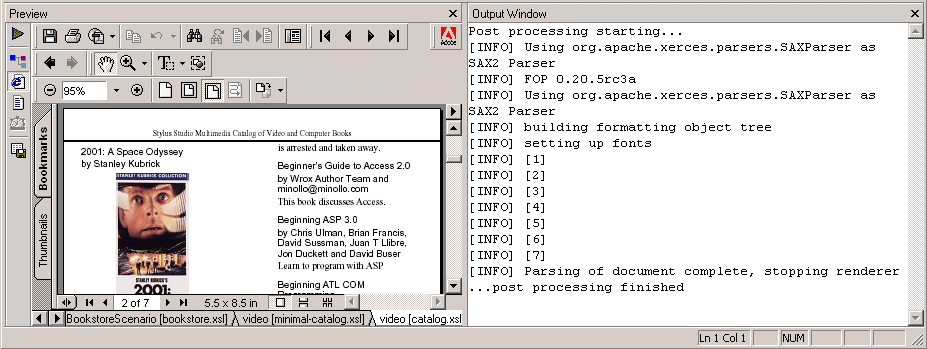
5. Click Preview Result .

Figure 231. Another Example of XSLT FO Processing

This time the PDF result in the Preview window is nicely formatted. The catalog.xsl stylesheet adds some basic formatting, as well as images, to the minimal-catalog.xsl stylesheet. Now it is easy to distinguish the title, author or director, and description for each video or book.

Getting EDI to XML and back to EDI Again: Round Trip Engineering using Stylus Studio URL Adapters

A free online video demonstration shows how to use Stylus Studio's Adapter URL technologies to convert EDI to XML and back again. Convert, validate, view and edit EDIFACT data directly in Stylus Studio.

Using DataDirect XQuery with Stylus Studio

Learn how to query any relational database using XQuery and the XQuery API for Java using DataDirect XQuery, an embeddable Java component, and Stylus Studio the world's leading XML IDE.

XPath Generator

Stylus Studio includes an XPath generator that helps you easily create XPath expressions. This page illustrates how you can accomplish this.

DTD Parser

Learn about the powerful DTD parser technologies that are supported in Stylus Studio's DTD tools, including DOM and SAX based DTD parsing components.

Stylus Most Wanted

 
Free Stylus Studio XML Training:
W3C Member