How to Run a Scenario

To run a scenario:
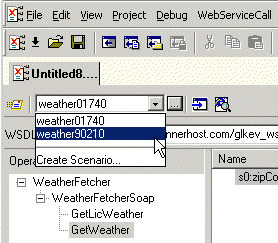
1. Select a scenario from the scenario drop-down list at the top of the editor window:

Figure 355. Picking a Saved Scenario

Alternative:

a. In the Web Service Call Composer tool bar, click .

Stylus Studio displays the Scenario Properties dialog box.

b. On the General tab, select the scenario you want to run from the Existing preview scenarios list.
c. Click OK.
2. Click the Send Request button ( ) .

Semiconductors & E-Components

Buuuuuzzzzz, zappp! There sure is a lot of electiricty flying with these semiconductors & c-component producers. It is because these top companies use Stylus Studio 2006 to light up their work day!

Transforming Non-XML Documents with XML Tools

This pages has audio from the Stylus Studio Presentation at Exchange 2005.

XML Schema-Aware Queries and Stylesheets

Learn how to simplify XSLT and XQuery applications using Schema Aware XSLT and XQuery processing technologies.

Create XML Schema from XML Content

Create XML Schema from XML Content by auto-generating an XML Schema with Stylus Studio.

Stylus Most Wanted

 
Free Stylus Studio XML Training:
W3C Member