Modifying a SOAP Request

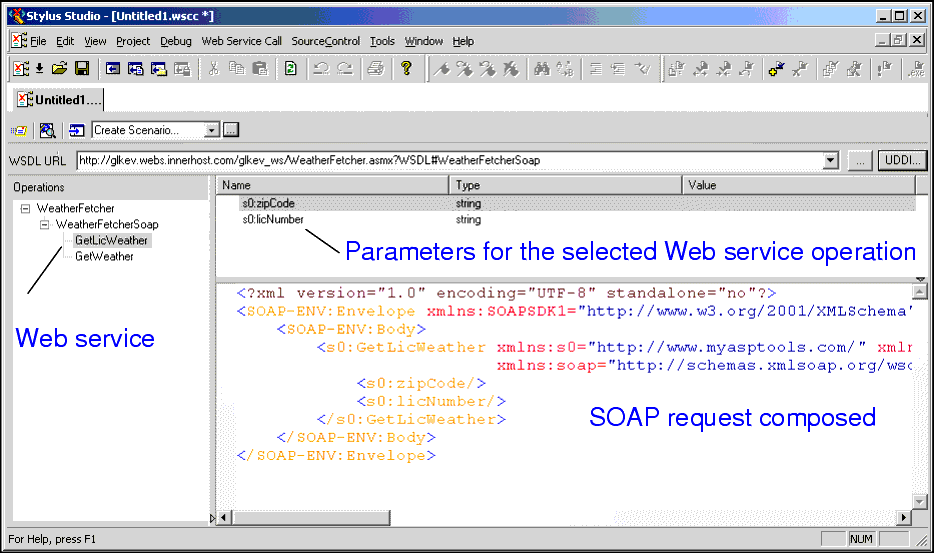
When you select a WSDL from the Result field in the UDDI Browser and click OK, the operations exposed by the Web service are displayed in the Stylus Studio Web Service Call Composer.

Figure 348. Modifying a SOAP request

When you select an operation from the Operations pane, Stylus Studio displays

  • Parameters associated with that operation, including their datatype and a field in which you can enter a value for testing purposes.
  • The XML that describes the SOAP request associated with that operation. You can edit the SOAP request, but for initial testing you should restrict changes to providing parameter values, and you can use the parameter's Value field for this purpose.

An Introduction To XML Schema Development

An Introduction to XML schema development in Stylus Studio covers some of the highlights of our XML Schema Editor, powerful tools for editing, validating, converting and generating XML schema. Watch the video online today!

Convert EDIFACT to XML Schema

Convert EDIFACT to XML with Stylus Studio's XML Schema and legacy data integration tools.

WSDL Editor

WSDL Editor featuring a graphical WSDL viewer, syntax help, Java Web Service code generation and more. Simplify Web Services development with Stylus Studio's Web Service Description Language (WSDL) Editor today!

Improving XSLT and XQuery Performance with Stylus Studio

This online video demonstration covers XQuery and XSLT performance tuning using the Stylus Studio XSLT profiler and the XQuery profiler.

Stylus Most Wanted

 
Free Stylus Studio XML Training:
W3C Member