Using Web Service Calls as XML

In addition to opening a Web service call in the Web Service Call Composer for testing purposes, you can open a Web service call as an XML document anywhere in Stylus Studio - in the XML editor, or as a source document in the XQuery mapper for example. When you open a Web service call as an XML document, Stylus Studio automatically executes the SOAP request and displays the SOAP response.

Consider the following Web service call, stock.wsc. The Web service operation used in this example returns current stock quote and other information based on the ticker symbols provided as parameters. Here is the SOAP request composed by Stylus Studio:

<?xml version="1.0" standalone="no"?>
               
<SOAP-ENV:Envelope xmlns:SOAPSDK1="http://www.w3.org/2001/XMLSchema" 
xmlns:SOAPSDK2="http://www.w3.org/2001/XMLSchema-instance" 
xmlns:SOAPSDK3="http://schemas.xmlsoap.org/soap/encoding/" xmlns:SOAP-
ENV="http://schemas.xmlsoap.org/soap/envelope/">
               
	SOAP-ENV:Body>
               
		<s0:GetStockQuotes xmlns:s0="http://swanandmokashi.com/">
               
			<s0:QuoteTicker>prgs</s0:QuoteTicker>
               
		</s0:GetStockQuotes>
               
	</SOAP-ENV:Body>
               
</SOAP-ENV:Envelope>


	<soap:Body>
               
		<GetStockQuotesResponse xmlns="http://swanandmokashi.com/">
               
			<GetStockQuotesResult>
               
				<Quote>
               
					<CompanyName>PROGRESS SOFT</CompanyName>
               
					<StockTicker>PRGS</StockTicker>
               
					<StockQuote>20.10</StockQuote>
               
					<LastUpdated>10:17am</LastUpdated>
               
					<Change>+0.03</Change>
               
					<OpenPrice>20.05</OpenPrice>
               
					<DayHighPrice>20.40</DayHighPrice>
               
					<DayLowPrice>20.00</DayLowPrice>
               
					<Volume>13200</Volume>
               
					<MarketCap>695.1M</MarketCap>
               
					<YearRange>11.50 - 24.06</YearRange>
               
				</Quote>
               
			</GetStockQuotesResult>
               
		</GetStockQuotesResponse>
               
	</soap:Body>
               
</soap:Envelope>


And here is the SOAP response returned by the Web service:

<?xml version="1.0" encoding="utf-8"?>
               
<soap:Envelope xmlns:soap="http://schemas.xmlsoap.org/soap/envelope/" 
xmlns:xsi="http://www.w3.org/2001/XMLSchema-instance" 
xmlns:xsd="http://www.w3.org/2001/XMLSchema">


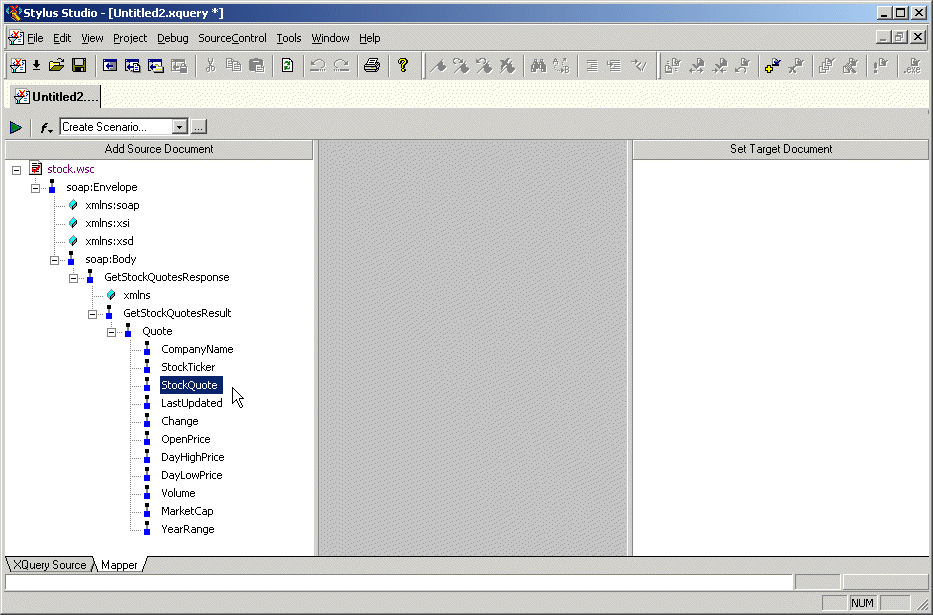
The saved Web service call can be used as the source document for an XQuery in the XQuery mapper, as shown in Figure 351:

Figure 351. Using a Web Service Call to Compose an XQuery

XQueries composed using a Web service call as a source document return real-time data from the Web service as a result.

XML Document Wizards

Stylus Studio XML Document Wizards help you easily convert EDI, flat files, and other document formats to industry-standard XML.

XML Development Blogs

Blogging is the hottest fad on the Internet and Stylus Studio has jumped on the bandwagon. Bookmark these XML Blogs to keep up with all the latest XML buzz in the internet blogosphere. Includes RSS and Atom Feeds!

Varying Record Layout to XML

Not every row in a text file has to have the same layout. Convert to XML has advanced pattern-recognition tools to route the data to where it belongs.

XQuery Editor

Stylus Studio's XQuery development tools are a tremendous help in building and testing XML applications requiring a standards-based approach to querying, integrating and transforming data from various distributed data sources.

Stylus Most Wanted

 
Free Stylus Studio XML Training:
W3C Member