Deleting Links in Sample Files

This topic is part of a sequence that starts with Opening the XSLT Mapper.

To delete links:
1. Click the Mapper tab if it is not already selected.
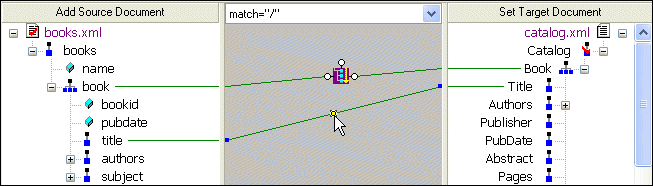
2. Click the title to Title link to select it.

Figure 52. Click a Link to Select It

3. Press the Delete key, or
a. Right-click the selected link. This displays a shortcut menu.
b. Click Delete to delete the selected link.

Tip


In addition to Delete, the shortcut menu displays the following options:

  • Go To Source displays the line of XSLT code represented by the link you select in the XML Editor.
  • Carry Value allows you to create <xsl:value-of select="."/> statements. This option is available for links representing xsl:for-each instructions only.

Why XQuery - The Case for XQuery

Read "The Case for XQuery" - an article that debuted in the November 2005 issue of SOA WebServices Journal, written by Jerry King, Vice President of DataDirect Technologies.

Industrial & Farm Equipment

Industrial & farm equipment manufacturers are mowing away the time it takes for data integration with the power of Stylus Studio 2006! See which top industrial and farm equipment manufacturers are cowboying up with Stylus Studio.

IATA Standards Available Across All Versions

The complete IATA Standards Grid, showing all IATA EDI versions across the top, and the catalog of messages types down the left-hand side.

XQuery and Web Services

XQuery provides a flexible means for data abstraction, while Web services provide process abstraction. In this online video demonstration, learn how integrated XQuery & Web service tools simplify development of XQuery-based Web service applications.

Stylus Most Wanted

 
Free Stylus Studio XML Training:
W3C Member