Cart
Cart
|
Home > Online Product Documentation > Table of Contents > Creating XML Schema from X12 Transaction Sets Creating XML Schema from X12 Transaction Sets
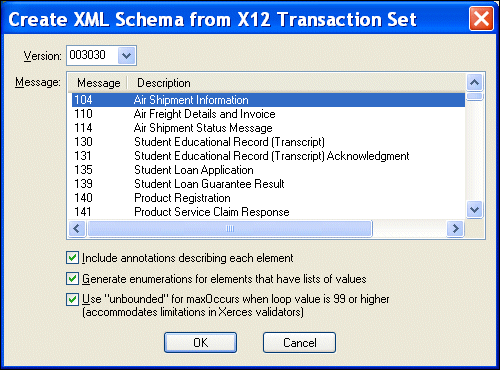
Stylus Studio Enterprise Edition provides a document wizard that allows you to create XML Schema based on an EDI X12 version and transaction set, such as the 811 (Consolidated Service Invoice/Statement) transaction set. Setting Wizard OptionsIn addition to selecting a specific X12 version and transaction set, Stylus Studio provides the following settings that determine how the XML Schema is generated. You can decide whether or not you want to Running the EDIFACT to XML Schema Documentation WizardTo run the X12 to XML Schema documentation wizard:
1. Select
File > Documentation Wizards from the Stylus Studio menu.
The Documentation Wizards dialog box appears.
2. Double-click the
X12 to XML Schema icon.
The Create XML Schema from X12 Transaction Set dialog box appears.
3. If necessary, change the X12 version ID. Versions are listed chronologically in ascending order.
4. Change the XML Schema creation options as required. See
Setting Wizard Options if you need help with this step.
5. Click OK.
Stylus Studio converts the X12 transaction set you selected in step 3 to XML Schema and opens a new, untitled document in the XML Schema Editor. |

XML PRODUCTIVITY THROUGH INNOVATION ™