Home >
Online Product Documentation >
Table of Contents >
Creating XML Schema from a DTD
Creating XML Schema from a DTD
Stylus Studio has two document wizards you can use to create an XML Schema from a DTD. One uses a built-in processor; the other uses the Trang schema converter from Thai Open Source Software Center (
www.thaiopensource.com). Using the Trang converter gives you more control over both the input file and output characteristics (such as whether or not you want to indent the XML Schema).
Using the DTD to XML Schema Document Wizard
To use the DTD to XML Schema wizard:
1. From the Stylus Studio menu bar, select
File >
Document Wizards.
The
Document Wizards dialog box appears.
2. In the
XML Editor tab, click
DTD to XML Schema, and click
OK.
The
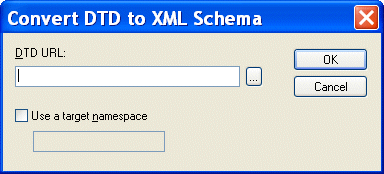
Convert DTD to XML Schema dialog box appears.
|
|
Figure 267. Convert DTD to XML Schema Dialog Box
3. In the
DTD URL field, type or select the absolute path for the DTD from which you want to create an XML Schema.
|
Note
|
|
The DTD must be encoded in UTF-8.
|
4. If you want, select the
Use a Target Namespace check box and type a target namespace.
5. Click
OK.
Stylus Studio displays the new XML Schema in the XML Schema Editor.
Using the DTD to XML (Trang) Document Wizard
The following table describes the fields in the
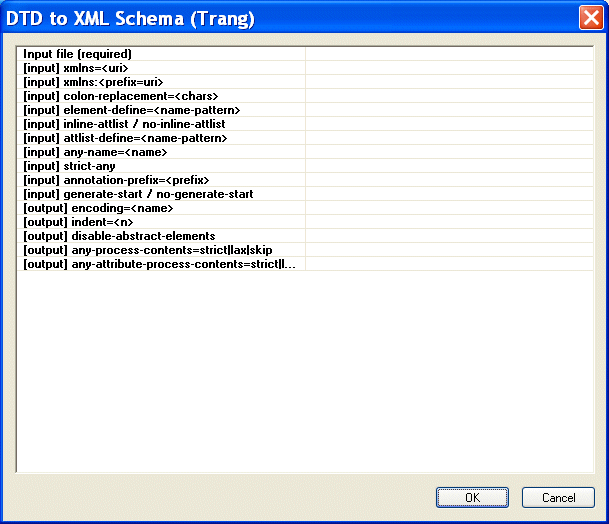
DTD to XML (Trang) dialog box, which is displayed when you run the DTD to XML (Trang) document wizard. This documet wizard was created using Stylus Studio Custom Document Wizard (see
Custom Document Wizards for more information).
|
FIeld
|
Description
|
|
Input file (required)
|
The name and location of the DTD file you want to convert to XSD. You can type the file name or use the
Browse button to browse a file system for the source DTD file.
|
|
[input] xmlns=<uri>
|
The default namespace; used for unqualified element names.
|
|
[input] xmlns:<prefix=uri>
|
The namespace for the element and autoboot names using
prefix.
|
|
[input] colon-replacement=<chars>
|
The character that is used to replace colons in element names. Used when constructing the names of definitions used to represent the element and attribute list declarations in the DTD. Trang generates a definition for each element declaration and attlist declaration in the DTD. The definition name is based on the element name. In RELAX NG, the definition names cannot contain colons; colons are allowed in element names in DTDs. Trang first tries to use the element names without prefixes. If this results in a conflict, Trang replaces the colon with the chars specified. If no chars is specified, a period is used.
|
|
[input] element-define=<name-pattern>
|
Specifies how to construct the name of the definition representing an element declaration from the name of the element. The
name-pattern must contain exactly one percent character (%). This character is replaced by the name of the element, after colon replacement, and the result is used as the name of the definition.
|
|
[input] inline-attlist / no-inline-attlist
|
inline-attlist specifies not to generate definitions for attribute list declarations. Instead, attributes in attribute list declarations are moved into the definitions generated for element list declarations.
no-inline-attlist generates a distinct definition (with combine="interleave") for each attribute list declaration in the DTD; each element declaration definition references the definition for the corresponding attribute list declaration.
|
|
[input] attlist-define=<name-pattern>
|
Specifies how to construct the name of the definition representing an attribute list declaration from the name of the element. The name-pattern must contain exactly one percent character (%). This character is replaced by the element name, after colon replacement, and the result is used as the name of the definition.
|
|
[input] any-name=<name>
|
Specifies the name of the definition generated for the content of elements declared in the DTD as having a content model of ANY.
|
|
[input] strict-any
|
Preserves the exact semantics of ANY content models by using an explicit choice of references to all declared elements. By default, Trang uses a wildcard that allows any element.
|
|
[input] annotation-prefix=<prefix>
|
Default values are represented using an annotation attribute prefix:defaultValue where prefix is bound to http://relaxng.org/ns/compatibility/annotations/1.0 as defined by the RELAX NG DTD Compatibility Committee Specification. By default, Trang uses a for prefix unless that conflicts with a prefix used in the DTD.
|
|
[input] generate-start / no-generate-start
|
Specifies whether or not Trang should generate a start element. DTDs do not indicate what elements are allowed as document elements. Trang assumes that all elements that are defined but never referenced are allowed as document elements.
|
|
[output] encoding=<name>
|
Uses name as the encoding for output files.
|
|
[output] indent=<n>
|
Indents each indent level in the output file by n spaces.
|
|
[output] disable-abstract-elements
|
Disables the use of abstract elements and substitution groups in the generated XML schema.
|
|
[output] any-process-contents=strict|lax|skip
|
Specifies the value for the processContents attribute of any elements. The default is strict, which corresponds to DTD semantics.
|
|
[output] any-attribute-process-contents=strict|lax|skip
|
Specifies the value for the processContents attribute of anyAttribute elements. The default is skip, which corresponds to RELAX NG semantics.
|
Table 40. DTD to XML (Trang) Document Wizard Fields
To use the DTD to XML Schema (Trang) wizard:
1. From the Stylus Studio menu bar, select
File >
Document Wizards.
The
Document Wizards dialog box appears.
2. In the
XML Editor tab, click
DTD to XML Schema (Trang) and click
OK.
The
DTD to XML Schema (Trang) dialog box appears.
|
|
Figure 268. DTD to XML Schema (Trang) Dialog Box
3. Enter the absolute path of the DTD from which you want to create an XML Schema. The DTD must be encoded in UTF-8. You can type the file path, or use the browse button (which appears when you place the cursor in the
Input file (required) field. This is the only required field.
4. Optionally, complete any of the remaining fields.
5. Click
OK.
Stylus Studio displays the new XML Schema in the XML Schema Editor.
 Cart
Cart