Referencing XML Schemas in the Diagram View

To reference an XML Schema in the Diagram view:
1. Right-click the schema node .
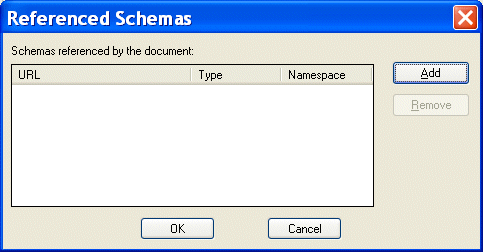
2. Click Referenced Schemas on the shortcut menu.

The Referenced Schemas dialog box appears.

Figure 291. Referenced Schemas Dialog Box

3. Click the Add button.

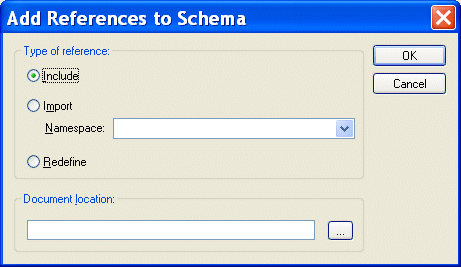
The Add References to Schema dialog box appears.

Figure 292. Add References to Schema Dialog Box

4. Specify the type of reference you want to make. If you are redefining an XML Schema, specify the namespace in the Namespace field.
5. Specify the URL of the XML Schema you want to reference. For example:
    • myfile.xsd
    • http://www.mycompany.com/schemas/myfile.xsd
    • \\fileserver\schemas\myfile.xsd
6. Click OK.

You are returned to the Referenced Schemas dialog box.

7. Click OK to add the referenced XML Schema to your XML Schema.

HTML Tidy

HTML Tidy is a program for turning HTML into something that can be parsed as XML, unlocking their data for use in XSLT and XQuery programs. Learn how to use HTML Tidy in Stylus Studio now.

Binary XML

How do I get my binary data into XML? How do I get my binary data out of XML? The answers to these questions and more in this amazing Binary XML tutorial.

Apache XML Project

The Apache XML Project provides standards-based, open-source XML solutions for working with W3C XML technologies including XML, XSL, XSLT, XSL:FO XPath, Web services and more. Learn how Stylus Studio provides support for all Apache XML projects.

W3C XML Specifications

Learn about the official W3C XML specifications for XML, XSLT, XQuery, XPath, DOM, XML Namespaces, XInclude, XML Base, XPointer, WSDL and more.

Stylus Most Wanted

 
Free Stylus Studio XML Training:
W3C Member