Cart
Cart
Home > XML IDE - XML Editor > Screenshots > XML Diff Tool


XML Diff Tool
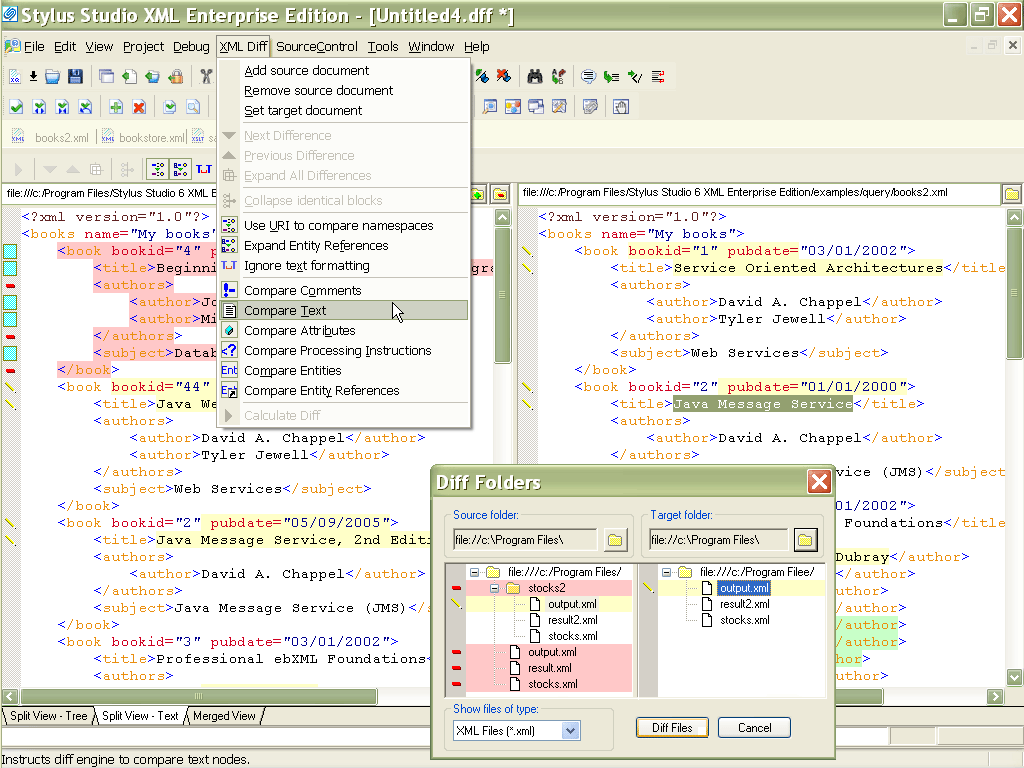
Stylus Studio® includes a built-in XML Differencing Tool that enables you to quickly and easily visualize differences in XML files. A recorded demonstration of our XML diff tool has been posted to the video section of the website. Illustrated below is Stylus Studio®'s XML Diff tool operating in a split-screen mode, displaying a source document on the left, and the target document on the right. Red text signifies deleted XML nodes, yellow means modified, and green means new. The XML diff tool is highly configurable and can handle many different XML comparison options, for example you can choose to compare or ignore whitespace, namespaces, entities, ordering, element content, and more. Additionally, Stylus Studio® provides options on how to optimize comparisons of large XML files. The bottom right of this illustration shows Stylus Studio®'s Directory differencing tool that allows you to compare entire directories. The XML Diff tool is integrated with the XML Tree View and the XML Text View of Stylus Studio®'s XML Editor, and switching views is just a matter of choosing a tab at the bottom of the editing screen. Don't get tricked into paying an additional $129 for those other XML diff tools that perform like real dogs — download Stylus Studio® today!