
Home > Products > Screenshots > Stylus Studio HTML-to-XML Importer Screenshot
HTML-to-XML Importer Screenshot
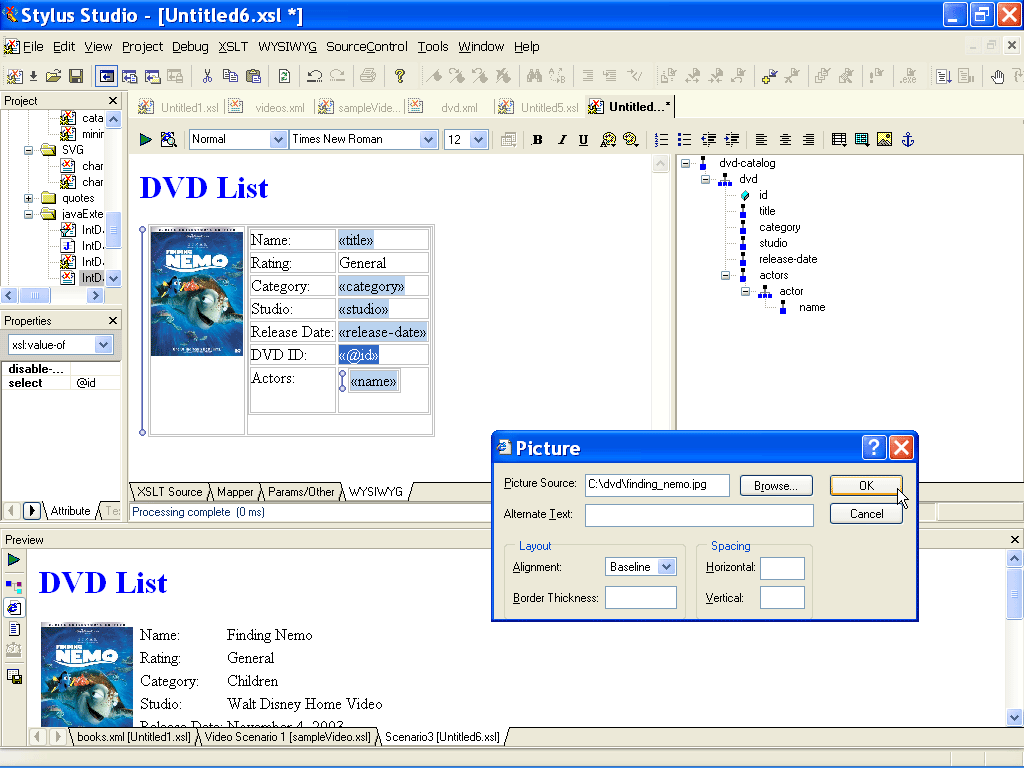
This screenshot shows an example of Stylus Studio®'s HTML-to-XML Importer. Existing HTML content has been separated into an XML file and an associated XSLT stylesheet. The XML file contains the page's data (the DVD name, its rating, category, studio, release date, and so on), and the XSLT stylesheet contains the formatting and layout information (tables, positioning, fonts, and so on). The blue tagged elements (<<title>>, for example) are placeholders for data drawn from the XML file. The blue vertical bar adjacent to the <<name>> data element and the video jacket image identifies repeating elements.
![]() |
Related Features
Saxon XSLT Processor
Stylus Studio® has partnered with Saxonica, a leading provider of Java-based XSLT and XQuery processing components to offer a robust XSLT 1.0 and 2.0 development environment, featuring development and deployment using the Saxon XSLT processor.
XML Notepad
XML Notepad simplifies building of XML applications, allowing authors to rapidly build and edit their XML files. With XML Notepad, you can create XML document prototypes quickly, easily, using an intuitive graphical interface.
Learn XQuery in 10 Minutes, by Dr. Michael Kay - An XQuery Tutorial
Learn XQuery in 10 Minutes By Dr. Michael Kay is for all those people who really want to know what XQuery is, but don't have the time to find out. It's the fastest XQuery tutorial on the planet - read it now!
XML Schema Editor
Stylus Studio's XML Schema Editor lets you easily develop advanced data models expressed in W3C XML Schema. Its synchronized split-pane interface shows both a visual XML Schema Diagram and the underlying code, and you can edit in either one.
