|
|
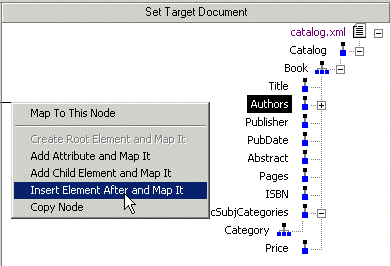
Home > Online Product Documentation > Table of Contents > Left and Right Mouse Buttons Explained Left and Right Mouse Buttons ExplainedYou can use either the left or the right mouse button to perform the drag and drop operation used to create source-target mappings in the XSLT mapper. If you use the left mouse button to perform the drag operation, the link always maps the source node to the target node without making any changes to the target structure. If you use the right mouse button, Stylus Studio displays a shortcut menu that provides you with alternatives for modifying the target structure.
Using this menu, you can
|

XML Schema Validator, DTD Validator
Stylus Studio lets you validate XML documents using integrated XML Schema or DTD validators. Use the Stylus Studio built-in validator, or any number of supported XML parsers and XML validators like MSXML SAX and DOM, Xerces, .NET, and more!
Using DataDirect XQuery with Stylus Studio
Learn how to query any relational database using XQuery and the XQuery API for Java using DataDirect XQuery, an embeddable Java component, and Stylus Studio the world's leading XML IDE.
Using Relational Data in XML Applications
"Using Relational Data in XML Applications" By Dr. Michael Kay covers an overview of several common use cases and provides insight into the benefits and drawbacks of using the approaches available today including XQuery and SQL/XML.
Apache AXIS
Develop and test Web service applications using Apache AXIS and Stylus Studio.