Descriptions of WYSIWYG Terms

The following terms are used to describe parts of the WYSIWYG tab:

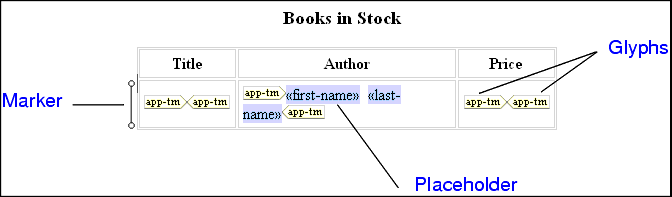
Figure 177. Parts of HTML Diagram in the WYSIWYG Tab

  • placeholder - an element or attribute name in double angle brackets. It represents dynamic text.
  • marker - a small image to the left of a placeholder or table row. Hold the cursor over a marker to see the XSLT instruction it represents and the context in which it operates.
  • glyphs - pairs of images that specify choose, if, or repeat. The corresponding XSLT instruction operates on the text represented by the enclosed placeholder or element.

To remove the glyphs, select the enclosed item, and right-click it to display a pop-up menu. Click Unwrap selected element.

Database-to-XML Mapping

Stylus Studio features several database-to-XML mapping tools that allow you to easily query a relational database using SQL/XML or SQL and render the results as XML. Stylus Studio also supports the world's first and only visual SQL/XML Editor!

Configuring the Java Runtime Engine or Java Development Kit

This page identifies the Stylus Studio modules that require Java runtime and Java compiler components, where you can download these Java components, and how to force Stylus Studio to detect new or changed Java components.

XPath Query Editor

Stylus Studio's XML Editor has an XPath Query Editor that allows you to easily roubleshoot, test, and debug any XPath expression.

XML-DEV Discussion Forum

XML-DEV is a leading technical forum for XML discussion and a valuable free XML learning resource. Subscribe to the XML-DEV email discussion forum today to help further your XML education.

Stylus Most Wanted

 
Free Stylus Studio XML Training:
W3C Member